
Introduction
GoHighLevel booking widgets are usually embedded as iframe booking forms, which means default form triggers in Google Tag Manager cannot detect the booking submission. To solve this, we implement gohighlevel booking tracking using gtm with a custom listener script and Data Layer event tracking.
✔ This setup allows you to track:
➜ GoHighLevel booking conversions
➜ Google Ads conversion tracking
➜ GA4 booking events
➜ GoHighLevel iframe booking tracking
➜ Accurate appointment tracking using GTM
Tracking will be configured using:
- Google Tag Manager
- Google Ads
- Google Analytics 4
Prerequisites
Before starting, make sure you have:
✔ Website with GoHighLevel booking iframe
✔ Google Tag Manager installed
✔ Access to Google Ads account
✔ Access to GA4 property
✔ GoHighLevel booking listener script
 Need Help?
 Hire Me for Setup: WhatsApp Me
Book a Consultation: Schedule a Call
Step-by-Step Implementation
PART 1 – Detect GoHighLevel Booking Event
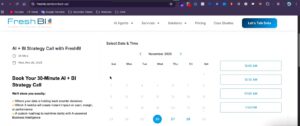
Step 1: Confirm Booking Widget Is an iframe
Open your website and inspect the booking section.
Right-click → View Frame Source.
✔ If the booking widget loads inside an iframe, the booking system is embedded.
Step 2: Add GoHighLevel Booking Listener Script
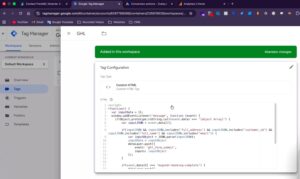
Add the custom JavaScript listener code to your website.
✔ This script will:
➜ Detect GoHighLevel booking completion
➜ Capture booking event
➜ Push booking data to the Data Layer
PART 2 – Test Data Layer Event
Step 3: Open GTM Preview Mode
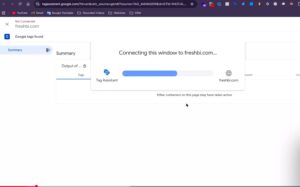
Open Google Tag Manager → Click Preview → Enter your website URL → Connect.
✔ If preview connects successfully, GTM is working.
Step 4: Test Booking Submission
Create a test booking on your website.
Example test process:
➜ Select booking date
➜ Choose available time
➜ Enter test name and email
➜ Confirm appointment
After confirmation, check GTM Preview Events.
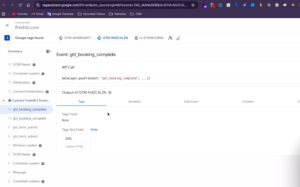
✔ You should see two events:
- form_submit
- booking_complete
✔ Use booking_complete event for conversion tracking.
PART 3 – Create GoHighLevel Booking Tracking Trigger in GTM
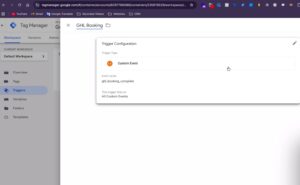
Step 5: Create Custom Event Trigger
- Open GTM → Create new trigger.
- Trigger Type: Custom Event
- Event Name: ghl_booking
- Save the trigger.
✔ This trigger fires when the booking_complete event occurs.
PART 4 – Google Ads Conversion Tracking for GoHighLevel
Step 6: Create Google Ads Conversion Action
Open Google Ads → Create new conversion action.
- Conversion type: Booking
- Conversion name: GoHighLevel Booking
- Count: One
Select Google Tag Manager as implementation method → Save.
✔ Copy the following:
- Conversion ID
- Conversion Label
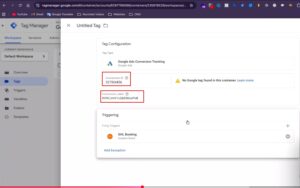
Step 7: Create Google Ads Conversion Tag
- Create a new tag in GTM.
- Tag Type: Google Ads Conversion Tracking
Add:
- Conversion ID
- Conversion Label
- Trigger: ghl_booking event
- Save the tag.
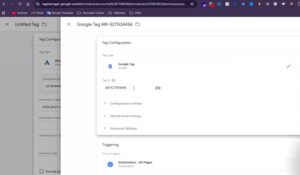
Step 8: Create Required Google Ads Tags
Google Tag
Create new tag → Tag Type: Google Tag → Add Conversion ID → Trigger: All Pages
📸 Screenshot Here – Google Tag Setup
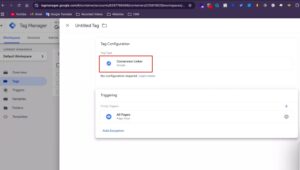
Conversion Linker
Create Conversion Linker tag → Trigger: All Pages
✔ This tag is required for accurate Google Ads attribution.
PART 5 – GA4 Booking Event Tracking
Step 9: Create GA4 Configuration Tag
Create new tag in GTM.
Tag Type: Google Tag
Add GA4 Measurement ID
Send Page View = True
Trigger: All Pages
Save as GA4 Configuration.
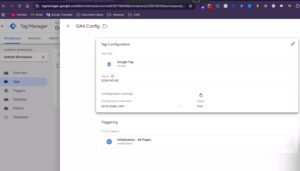
Step 10: Create GA4 Booking Event Tag
Create another tag.
Tag Type: GA4 Event
Event Name: booking
Measurement ID: GA4 Measurement ID
Trigger: ghl_booking event
Save the tag.
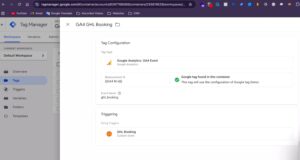
Testing GoHighLevel Booking Tracking
Open GTM Preview Mode → Open GA4 DebugView → Create another test booking.
✔ Confirm the following:
➜ GoHighLevel booking event fires
➜ Google Ads conversion tag fires
➜ GA4 booking event fires
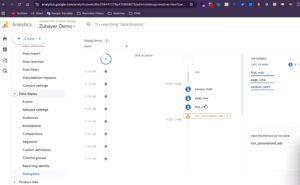
Final Publish Step
Publish the GTM container.
✔ Your GoHighLevel booking conversion tracking is now active for:
- Google Ads conversions
- GA4 booking events
Frequently Asked Questions
Why doesn’t default form tracking work with GoHighLevel?
Because GoHighLevel booking widgets are embedded inside an iframe.
Why use a listener script?
It captures booking completion events and pushes them into the Data Layer.
Why do two events appear during testing?
One event is form submission and the other is booking completion.
Which event should be used for tracking?
Use booking_complete event.
Does Google Ads conversion appear instantly?
No, conversions may take some time to appear in the Google Ads dashboard.
Professional Conclusion
✔ By implementing this setup, you now have:
➜ GoHighLevel booking conversion tracking
➜ Reliable Google Ads conversion measurement
➜ Accurate GA4 booking event tracking
➜ Structured Data Layer event tracking
This ensures accurate tracking for GoHighLevel iframe booking forms.
Need expert help with GoHighLevel booking tracking?
Hire Me for Setup: WhatsApp Me
Book a Consultation: Schedule a Call
