
Quick Answer
GoHighLevel form tracking with GTM requires a custom JavaScript event listener in Google Tag Manager, because GoHighLevel forms are embedded inside an iframe and GTM’s standard Form Submission trigger cannot detect iframe events. Specifically, you add a Custom HTML tag containing a window.addEventListener script that listens for GHL’s form submission postMessage and pushes a ghl_form_submit event to the Data Layer, then create a Custom Event trigger and a GA4 event tag to send the form_submission event to Google Analytics 4 with the form ID and page details. Every GoHighLevel form submission on your landing page becomes a trackable conversion event in GA4, giving you accurate lead data to optimize Google Ads campaigns and smart bidding strategies.
Key Takeaways
✅ GoHighLevel forms load inside an iframe, so GTM’s built-in Form Submission trigger will not work.
You must use a custom JavaScript event listener in a Custom HTML tag. This listener intercepts GHL’s postMessage events and pushes a custom event to window.dataLayer when a form is successfully submitted, making the submission visible to Google Tag Manager and every downstream tag you configure.
✅ The GHL form listener tag must fire on All Pages via the Initialization trigger.
The event listener needs to be active before the GoHighLevel form loads inside the iframe. Because GTM fires tags based on triggers, the Custom HTML tag containing the listener must use the Initialization All Pages trigger to ensure it is always registered when a visitor submits a form on any page of your GoHighLevel funnel.
✅ GoHighLevel form tracking with GTM needs three components: a Custom HTML listener tag, a Custom Event trigger, and a GA4 event tag.
Specifically, the Custom HTML tag adds the JavaScript listener to the page, the Custom Event trigger fires when the listener pushes ghl_form_submit to the Data Layer, and the GA4 event tag reads that trigger and sends form_submission to Google Analytics 4 with the form ID and page URL as event parameters.
✅ Always validate GoHighLevel form tracking in GTM Preview Mode before publishing to production.
Open GTM Preview Mode, connect to your GoHighLevel landing page, submit the form, and confirm the ghl_form_submit event appears in the event list with the correct form data. Then verify the form_submission event appears in GA4 DebugView, because publishing without validation risks deploying broken tracking that fails silently and leaves your Google Ads campaigns without any lead conversion signal.
Introduction
GoHighLevel form tracking with GTM is one of the most requested setups among digital marketing agencies and lead generation businesses. GoHighLevel has become the dominant all-in-one CRM and funnel platform for agencies, and with thousands of businesses running Google Ads campaigns that send traffic to GHL landing pages, accurate form submission tracking is a critical infrastructure requirement, not an optional add-on.
The core problem is technical. GoHighLevel embeds its forms inside an iframe element, which is a completely separate browsing context from your main page. GTM’s built-in Form Submission trigger works by listening for standard HTML form events on the page DOM. Because the DOM inside a GHL iframe is inaccessible to GTM running on the parent page, every attempt to track GoHighLevel forms using the native GTM form trigger fails silently. Your GA4 property shows zero form submission events while your GHL CRM accumulates leads, and Google Ads Smart Bidding operates without any conversion signal, optimizing toward page views instead of actual leads.
As a Stape.io Certified Partner and Marketing Attribution Specialist, I have implemented GoHighLevel form tracking for dozens of agency clients across industries including roofing, legal, medical, and real estate. This guide covers the exact setup: custom JavaScript listener, Data Layer variable creation, GA4 event tag configuration, and GTM Preview Mode validation, so every GHL form submission on your landing pages fires accurately in GA4.
Watch Now
Figure 1: How to Track GoHighLevel Landing Page and Form Submission with GTM and GA4
What Is GoHighLevel Form Tracking with GTM?
GoHighLevel form tracking with GTM is the process of capturing every successful GHL form submission on your landing page or funnel and sending that event, along with form data and page details, into Google Analytics 4 as a trackable conversion event, using Google Tag Manager to deploy the tracking without modifying any GHL funnel code directly.
Because GoHighLevel forms are loaded inside an iframe, they communicate with the parent page using the browser’s postMessage API. When a visitor submits a GHL form successfully, the platform fires a message from inside the iframe to the parent window. Your custom JavaScript listener in GTM intercepts that postMessage on the parent page and pushes a structured event to window.dataLayer, which GTM reads and uses to fire your GA4 event tag.
For technical reference on GA4 event tracking implementation, see the GA4 Events documentation from Google’s developer documentation.
Why GoHighLevel Form Tracking in GA4 Matters
For lead generation businesses running paid traffic to GoHighLevel funnels, form submissions are the primary conversion event. Without accurate GoHighLevel form tracking, you cannot connect advertising spend to actual leads. Every campaign optimization decision runs on incomplete data, and every budget allocation reflects clicks and sessions rather than qualified form completions.
Without proper GoHighLevel form tracking with GTM, these problems occur:
- GA4 shows zero conversion events despite real form submissions happening every day across your funnels
- Google Ads Smart Bidding has no lead signal, optimizing toward clicks and page views rather than actual form submissions
- You cannot identify which landing pages, campaigns, or keywords generate the most qualified leads from your GHL funnels
- Meta Ads and Google Ads receive no conversion data, so lookalike audiences are built on incomplete signals
- GoHighLevel CRM lead attribution cannot be verified against GA4 campaign data, creating a permanent attribution blind spot
With accurate GoHighLevel form tracking in GA4, you gain:
- Every form submission fires a trackable conversion event in GA4 with form ID and page URL as event parameters
- Google Ads conversion tracking receives real lead signals, enabling Smart Bidding to optimize toward actual GHL form submissions
- GA4 reports show which campaigns, landing pages, and traffic sources drive the most form completions on your GoHighLevel funnels
- Marking form_submission as a key event in GA4 enables direct import into Google Ads for lead-based Target CPA and Target ROAS bidding
How the System Works, Complete Data Flow
Before building the setup, it is important to understand exactly why GoHighLevel forms require a custom approach. This is a five-step chain from form submission to GA4 event.
Figure 2: Complete Data Flow, GoHighLevel Form Submission Through GTM Custom Listener to GA4
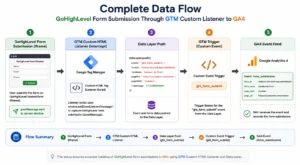
- Step 1: A visitor fills out and submits a GoHighLevel form on your landing page. The GHL form is loaded inside an iframe, a completely separate browsing context from your main page.
- Step 2: GoHighLevel fires a postMessage from inside the iframe to the parent window when the form is submitted successfully. This message contains the submission data and serves as the only reliable signal available to code running on the parent page.
- Step 3: The custom JavaScript listener in your GTM Custom HTML tag intercepts this postMessage on the parent window and pushes a structured event to dataLayer containing the event name and form data.
- Step 4: GTM detects the ghl_form_submit Data Layer push and fires the Custom Event trigger. Subsequently, the GA4 event tag fires and sends a form_submission event to Google Analytics 4 with the form ID and page URL.
- Step 5: GA4 records the form_submission event. It appears in DebugView in real time and flows into GA4 Engagement reports, giving you full visibility into which landing pages and campaigns drive GoHighLevel form completions.
Prerequisites
Before starting, make sure the following are in place:
- Google Tag Manager installed on your GoHighLevel landing page or funnel
- GA4 property created with a Measurement ID ready (G-XXXXXXXXXX)
- GA4 Configuration tag already published in your GTM container
- GoHighLevel funnel with a form embedded and accessible for testing
- GTM Preview Mode access for testing before publishing
- GA4 DebugView access for real-time event verification
- Access to submit a real test form submission during validation
- Stape.io account if planning to add server-side tracking for ad-blocker resilient form tracking
IMPORTANT: This guide covers GoHighLevel forms on GHL landing pages and funnels. Installing GTM on GoHighLevel requires adding your GTM head and body snippets in GHL under Settings, then Tracking Code, or directly inside your funnel settings under Tracking Code. The custom listener works identically across all GHL funnel types.
Step-by-Step Implementation
Step 1: Install Google Tag Manager on Your GoHighLevel Funnel
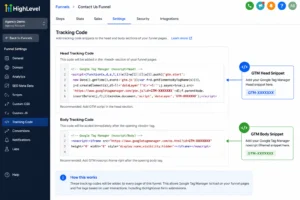
To begin, log into your GoHighLevel account and navigate to your funnel. Go to the funnel settings and locate the Tracking Code section. Paste your GTM head snippet between the opening and closing <head> tags and your GTM body snippet immediately after the opening <body> tag.
Alternatively, go to GHL Settings, then Custom Domains, and confirm your funnel is connected to your domain. Add the GTM snippets at the funnel level rather than individual page level to ensure GTM fires on all pages of the funnel automatically.
CRITICAL: GTM must be installed on the GoHighLevel funnel BEFORE the form listener tag will work. If GTM is not installed correctly on the GHL page, the Custom HTML listener tag has no container to load into and no Data Layer to push events to. Verify GTM is firing by opening GTM Preview Mode and connecting it to your GHL funnel URL before proceeding.
Figure 3: GTM Installation on GoHighLevel Funnel via Tracking Code Settings
Step 2: Create the GoHighLevel Form Listener Tag in GTM
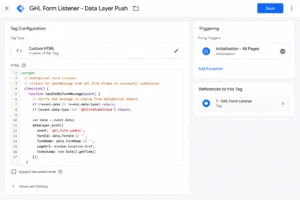
In Google Tag Manager, navigate to Tags, then New, then Tag Configuration, then Custom HTML. Paste the following JavaScript listener script into the Custom HTML field:
This script listens for the postMessage that GoHighLevel sends on every successful form submission. Specifically, it checks for FORM_SUBMITTED as the message type, which is GHL’s identifier for a completed submission. When the condition is true, it pushes ghl_form_submit to the Data Layer along with the form ID and the current page URL.
Set the trigger to Initialization All Pages. Name the tag Custom HTML, GHL Form Listener and save.
CRITICAL: The trigger must be set to Initialization All Pages, not a Page View trigger limited to specific URLs. The listener needs to be active before the GoHighLevel form loads inside the iframe. If the listener fires after the form is already loaded and submitted by a fast visitor, the postMessage event is missed entirely.
Figure 4: GTM Custom HTML Tag, GHL Form Listener Script with Initialization All Pages Trigger
Step 3: Create the Data Layer Variable for Form ID
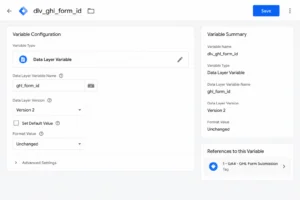
In GTM, go to Variables, then New, then Variable Configuration, then Data Layer Variable. Set the Data Layer Variable Name to ghl_form_id. Set the Data Layer Version to Version 2. Name the variable dlv_ghl_form_id and save.
This variable reads the form ID that the listener pushes to the Data Layer with every GoHighLevel form submission. Passing the form ID as an event parameter in your GA4 tag allows you to identify exactly which GHL form was submitted in your GA4 reports, which is critical when you have multiple forms across different funnel pages.
Figure 5: GTM Data Layer Variable, ghl_form_id for GoHighLevel Form ID Tracking
Step 4: Create the Custom Event Trigger
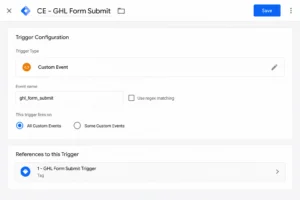
In GTM, go to Triggers, then New, then Trigger Configuration, then Custom Event. Set the Event Name to ghl_form_submit. This must match exactly the event name in your Custom HTML listener script, including underscores and capitalization. Name the trigger CE, GHL Form Submit and save.
CRITICAL: The event name in the Custom Event trigger must exactly match the event name in the Data Layer push. Specifically, ghl_form_submit with an underscore is different from ghl-form-submit with a hyphen or GhlFormSubmit in camelCase. Always copy the event name directly from the listener script rather than typing it manually in the trigger configuration.
Figure 6: GTM Custom Event Trigger, ghl_form_submit Event Name for GoHighLevel Form Tracking
Step 5: Create the GA4 Form Submission Event Tag
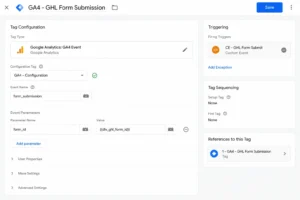
In GTM, go to Tags, then New, then Tag Configuration, then Google Analytics: GA4 Event. Set the Configuration Tag to your existing GA4 Config tag. Set the Event Name to form_submission, lowercase, no spaces.
Under Event Parameters, add:
| Parameter Name | Value |
| form_id | {{dlv_ghl_form_id}} |
| page_location | {{Page URL}} |
| page_title | {{Page Title}} |
Set the trigger to CE, GHL Form Submit. Name the tag GA4, GHL Form Submission and save.
Figure 7: GTM GA4 Event Tag, form_submission with form_id Parameter and CE GHL Form Submit Trigger
Step 6: Test in GTM Preview Mode
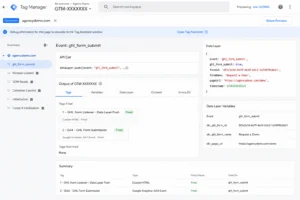
Go to GTM Workspace and click Preview. Enter the URL of your GoHighLevel landing page and connect. Fill in the form and submit it. In GTM Preview Mode, confirm:
- ghl_form_submit event appears in the event list on the left panel
- Custom HTML, GHL Form Listener tag shows as Fired
- GA4, GHL Form Submission tag shows as Fired
- The ghl_form_id variable is populated with the correct GoHighLevel form ID
CHECK: If the ghl_form_submit event does not appear after submitting the form, the listener is not firing correctly. Verify the Custom HTML tag trigger is set to Initialization All Pages. Additionally, check your browser console for JavaScript errors and confirm GTM Preview Mode is connected to the correct GHL funnel URL.
Figure 8: GTM Preview Mode, GHL Form Submit Event Fired with Form ID in Data Layer
Step 7: Verify in GA4 DebugView and Publish
In GA4, go to Admin and then DebugView. Submit another test form. Confirm the form_submission event appears in real time with the correct form_id parameter matching your GoHighLevel form ID.
Once verified, go to GTM, then Submit, name the version GHL Form Tracking Setup, and Publish. Finally, in GA4, go to Configure and Events, find the form_submission event, and toggle Mark as key event to ON. This event becomes available for Google Ads conversion import and appears in your GA4 key events report for campaign optimization.
Default GTM Form Trigger vs Custom GHL Listener, Comparison
| Feature | Default GTM Form Trigger | Custom GHL Listener (GTM) |
| Works with GHL iframe | ❌ Cannot see inside iframe | ✅ Intercepts postMessage from iframe |
| Tracks form submission | ❌ Fails silently | ✅ Fires on every successful submission |
| Form ID available | ❌ No form identifier | ✅ ghl_form_id passed to GA4 |
| GA4 event fired | ❌ Never fires | ✅ form_submission event in GA4 |
| Google Ads conversion signal | ❌ No lead data | ✅ Import form_submission as conversion |
| Multiple forms distinguishable | ❌ Cannot separate forms | ✅ Each form tracked by unique form ID |
| Page URL tracking | ❌ No submission context | ✅ page_location parameter included |
| GTM Preview testable | ❌ Nothing to validate | ✅ Full validation in GTM Preview Mode |
| Meta Pixel compatible | ❌ No trigger available | ✅ Same CE trigger fires Meta Lead tag |
| Reliability across browsers | ❌ Completely unreliable | ✅ Consistent in all modern browsers |
Real Use Case, GoHighLevel Funnel for Lead Generation
To illustrate the impact of correct GoHighLevel form tracking, consider this client example. A roofing company was running Google Ads campaigns sending traffic to a GoHighLevel funnel with a quote request form. After three months of campaigns, the Google Ads account showed 0 conversions while the GoHighLevel CRM recorded 210 leads. The client was ready to pause Google Ads entirely, believing the campaigns were not working.
Before custom GTM listener implementation:
- GA4 form submission events: 0, despite 210 monthly form completions recorded in GoHighLevel CRM
- Google Ads Smart Bidding optimizing toward page views and session duration with no lead conversion signal
- No ability to identify which campaigns, ad groups, or keywords generated the most qualified roofing leads
- Budget distributed equally across all campaigns because performance data was entirely unavailable
- Cost per lead: unmeasurable, consequently the client was considering shutting down all paid advertising
After implementing GoHighLevel form tracking with custom GTM listener, 30 days:
- GA4 recording 203 form submissions in the first 30 days, matching GoHighLevel CRM lead count within 3.3%
- Google Ads Smart Bidding switched to Target CPA, optimizing toward actual GHL form submissions within 14 days
- GA4 revealed one campaign driving 68% of all leads despite receiving only 41% of the total budget
- Budget reallocated from underperforming campaigns to the top performer, cost per lead dropped 38% within 30 days
- Form ID tracking revealed which funnel page variant had higher completion rates, improving form completion rate by 22%
Tools Used
| Tool | Purpose |
| Google Tag Manager | Custom HTML listener tag, triggers, variables, and GA4 event tag management |
| Google Analytics 4 | Receives form_submission events and displays in DebugView and Engagement reports |
| GoHighLevel | CRM and funnel platform, forms embedded via iframe on landing pages |
| GTM Preview Mode | Validates listener and GA4 tags fire correctly before publishing to production |
| GA4 DebugView | Real-time form_submission event verification after publishing |
| GHL Tracking Code | Section in GoHighLevel funnel settings where GTM snippets are installed |
Common Mistakes
Mistake 1, Using GTM’s Built-In Form Submission Trigger for GoHighLevel
The most common mistake in GoHighLevel form tracking is using GTM’s built-in Form Submission trigger type. Because GHL forms are inside an iframe, GTM’s native form listener cannot access the iframe’s DOM. The trigger never fires regardless of how many forms are submitted, consequently GA4 shows zero form conversion events while GoHighLevel CRM records real leads every day. Always use the custom window.addEventListener listener script in a Custom HTML tag instead of the built-in trigger type.
Mistake 2, Mismatched Event Name in Custom Event Trigger
The event name in the Custom Event trigger must exactly match the event name pushed to the Data Layer in the Custom HTML listener script. Specifically, ghl_form_submit with an underscore is different from ghl-form-submit with a hyphen or GhlFormSubmit in camelCase. If the names do not match, GTM never fires the GA4 tag. Your form submissions push to the Data Layer correctly but no GA4 event is ever sent. Always copy the event name directly from the listener script into the trigger configuration field.
Mistake 3, Listener Tag Firing on Specific Pages Instead of All Pages
Setting the Custom HTML listener tag to fire only on the specific funnel page URL means the listener may not be active during page initialization. GoHighLevel’s iframe may load and accept a form submission before the listener registers, particularly for visitors who submit forms immediately on page load. Always set the Custom HTML tag trigger to Initialization All Pages to ensure the listener is registered before any GHL form can load on the page.
Mistake 4, Not Marking form_submission as a Key Event in GA4
After publishing the GTM setup, many implementations stop at tracking the event in GA4 without completing the final step. Until form_submission is marked as a key event in GA4, it does not appear in Google Ads conversion import, is not visible in GA4 key events reports, and cannot be used for Smart Bidding optimization. After validating the event in DebugView, always navigate to GA4, then Configure, then Events, and toggle the form_submission event to Mark as key event before considering the implementation complete.
Mistake 5, Not Verifying GTM Installation on GoHighLevel Before Testing
A common time-wasting mistake is building the entire listener setup in GTM and then discovering GTM was never properly installed on the GoHighLevel funnel. Before creating any tags, verify GTM Preview Mode can connect to your GHL funnel URL and that the GTM container fires on page load. Open GTM Preview, enter your funnel URL, and confirm the Initialization event appears in the left panel. If GTM does not fire at all, the listener tag has no container to load into and no events will ever reach GA4.
Advanced Optimization Strategies
Tips 1: Track Multiple GoHighLevel Forms Separately Using Form ID Filtering
If your GoHighLevel funnel has multiple forms, for example a contact form, a booking form, and a webinar registration form, you can track each one as a separate GA4 conversion event by filtering on the ghl_form_id parameter. Specifically, create individual Custom Event triggers with a filter where dlv_ghl_form_id equals the specific form’s ID. GA4 reports then show separate conversion events per form type, enabling precise campaign optimization based on which specific form each visitor completed on your GoHighLevel funnel.
Tips 2: Import GoHighLevel Form Submissions into Google Ads as Lead Conversions
Once the form_submission event is marked as a key event in GA4, link your GA4 property to Google Ads and import the event as a conversion action. Specifically, go to Google Ads, then Tools, then Conversions, then Import, then Google Analytics 4 Properties and select the form_submission event. Set a conversion value reflecting your average lead-to-revenue rate. Smart Bidding in Google Ads then receives real GHL lead signals, enabling Target CPA bidding to optimize toward actual form submissions rather than page views or session duration.
Tips 3: Add Enhanced Conversions by Capturing GoHighLevel Form Email Data
GoHighLevel form submissions can include the submitter’s email address in the postMessage data. Extend your listener script to capture the email field value and pass it through GTM’s User-Provided Data variable to enable Google Ads Enhanced Conversions, recovering 15 to 25% of lead conversions from iOS users and ad blocker users. For Enhanced Conversions setup, see the Enhanced Conversions for Web documentation from Google Ads support.
Tips 4: Send GoHighLevel Form Submissions to Meta Pixel via GTM
The same CE, GHL Form Submit trigger that fires your GA4 tag can also fire a Meta Pixel Lead event tag simultaneously, tracking GoHighLevel form completions in Meta Ads without additional listener setup. Create a Custom HTML tag with fbq(“track”, “Lead”) triggered by CE, GHL Form Submit. If you have Stape.io server-side tracking configured, route the Meta Lead event through your server container for higher Event Match Quality and improved attribution accuracy for iOS users.
Tips 5: Use Stape.io Server-Side Tracking for Ad-Blocker Resilient Form Tracking
Browser-side GA4 and Meta tags can be blocked by ad blockers, consequently losing GoHighLevel form submission tracking for privacy-conscious users. Configure your Stape.io server container to receive the form submission event and forward it to GA4 and Meta CAPI from the server, bypassing all browser-level blocking. Because the Data Layer push from the GHL listener already contains the form ID and can be extended to include hashed email, the Stape.io server container receives a complete, high-quality lead conversion event for every GoHighLevel form submission, regardless of whether the visitor uses an ad blocker or a privacy-focused browser.
Frequently Asked Questions
Why doesn’t GTM’s built-in form trigger work for GoHighLevel form tracking?
GTM’s built-in Form Submission trigger works by listening for standard HTML form submit events on the page’s DOM. However, GoHighLevel forms are embedded inside an iframe, a completely separate browsing context from your main page. Because of browser security restrictions, GTM running on the parent page cannot access DOM events inside the iframe. The standard form trigger never detects GHL form submissions, so you must use a custom window.addEventListener script that intercepts GoHighLevel’s postMessage communication between the iframe and the parent window.
How do I install Google Tag Manager on a GoHighLevel funnel?
To install GTM on a GoHighLevel funnel, log into GoHighLevel and navigate to your funnel. Click Settings on the funnel, then scroll to the Tracking Code section. Paste your GTM head snippet in the Head Tracking Code field and your GTM body snippet in the Body Tracking Code field. Save the funnel settings. If you use GoHighLevel Sites rather than Funnels, the same Tracking Code section is available under each site’s settings. After saving, verify GTM is loading by opening GTM Preview Mode and connecting it to your GHL funnel URL.
What is the GoHighLevel form postMessage and how does it work?
GoHighLevel uses the browser’s postMessage API to communicate form events from inside the iframe to the parent page. When a visitor submits a GHL form successfully, the form inside the iframe sends a message to the parent window containing a type field identifying the event. Because this is the only reliable method to detect a GHL form submission from outside the iframe, the custom listener script specifically checks for the correct message type before pushing to the Data Layer. This approach works across all GoHighLevel form types including standard forms, multi-step forms, and survey forms.
Can I use this GoHighLevel form tracking setup for Google Ads as well?
Yes, once the Custom Event trigger CE, GHL Form Submit is configured, you can add a Google Ads Conversion tag using the same trigger. Create a new tag, select Google Ads Conversion Tracking, enter your Conversion ID and Label from Google Ads, and assign the CE, GHL Form Submit trigger. Additionally, import the GA4 form_submission key event into Google Ads via Tools, then Conversions, then Import, then Google Analytics 4 Properties for a complete lead conversion tracking setup that feeds Smart Bidding with real GoHighLevel form submission data.
Does GoHighLevel form tracking work for multi-step funnels?
Yes, the custom window.addEventListener listener approach works for GoHighLevel multi-step funnels as long as GTM is installed on the funnel and the listener tag fires on Initialization All Pages. Because the listener is registered on every page load across all funnel steps, it is active when the visitor reaches the final form submission step. The postMessage event fires on the final successful submission, not on each individual funnel step, so you capture the actual lead conversion event rather than intermediate funnel interactions.
What if the GoHighLevel form listener is not firing in GTM Preview?
First, verify in GTM Preview Mode that the Custom HTML listener tag shows as Fired on the Initialization event. Open GTM Preview, navigate to your GoHighLevel funnel page, click on the Initialization event in the left panel, and confirm your Custom HTML tag appears under Tags Fired. Submit the form and check whether ghl_form_submit appears in the event list. If the tag fires but the event does not appear, check the browser console for JavaScript errors. If the tag does not fire at all, verify the trigger is set to Initialization All Pages and that GTM is correctly installed on the GHL funnel. Additionally, if you have Stape.io server-side tracking, confirm the server container is also receiving events correctly.
Conclusion
In summary, GoHighLevel form tracking with GTM requires one key insight. GHL’s iframe-based forms are invisible to GTM’s standard form trigger, but completely trackable with a custom window.addEventListener listener. Once the listener script is in place, the complete setup is straightforward: the listener captures GoHighLevel’s postMessage event, pushes it to the Data Layer, and your GA4 event tag fires with the form ID and page details on every successful submission across every page of your funnel.
Every GoHighLevel form completion becomes a trackable conversion in GA4, so you can identify which campaigns, keywords, and landing pages drive real leads, enabling data-driven budget allocation, accurate Smart Bidding optimization, and a direct connection between your advertising spend and the leads that enter your GoHighLevel CRM. Ultimately, this single GTM setup transforms every GHL funnel from a traffic destination into a fully measured lead generation system.
Related Posts
- HubSpot Form Tracking with GTM and GA4 (Landing Page Setup Guide 2026)
- Full Funnel Tracking for Google Ads using CRM, GTM and Stape
- How to Make Future Proof Conversion Tracking in 2026 (Full Funnel System for Lead Generation)
Ready to Fix Your GoHighLevel Form Tracking in GTM?
If your GoHighLevel forms are not tracking in GA4 and Google Ads, every lead generation campaign you run is operating without conversion data. Budget is allocated based on clicks and impressions, not actual form submissions and qualified leads.
👉 Book a free consultation
👉 WhatsApp me directly
