

Introduction
Conversion tracking in 2026 is no longer just about counting form submissions. Browser restrictions, iOS privacy updates, ad blockers and cookie limitations are quietly breaking the tracking setups most businesses built 2 to 3 years ago. The businesses still scaling confidently are the ones that built their tracking around first-party data, combining server-side tracking, CRM attribution, offline conversions and revenue reporting into one connected system.
As a Stape Certified Partner, I have built this exact setup for dozens of lead generation businesses. This guide covers the complete system from server-side tracking to CRM lifecycle events to revenue attribution in Google Ads.
➡️ Google Tag Manager helps businesses deploy scalable tracking systems across websites, forms, events, and analytics platforms. To understand server-side data recovery, explore Google Ads First Party Server-Side Tracking with GTM & Stape (Complete Setup Guide 2026). If you want accurate attribution and better campaign performance, building a future proof conversion tracking setup is the smartest move for 2026. For CRM revenue attribution, read How to Set Up Google Ads Offline Conversion Tracking with HubSpot CRM (Complete Guide 2026).
🎥 Watch Now
Figure: Full Funnel Conversion Tracking System for Lead Generation
Struggling with broken conversion tracking and missing lead data? Get a professional future-proof tracking setup using GTM, GA4, CRM attribution, and server-side tracking for accurate reporting and better ROI.
👉 WhatsApp: https://wa.me/8801735749155
👉 Book a Call: https://zcal.co/zubayerislam01/consultation
What Is Future Proof Conversion Tracking?
Future proof conversion tracking is a modern tracking system designed to continue working despite browser restrictions, privacy updates, and changing ad platform rules. Instead of relying only on browser cookies, it combines first-party data, CRM reporting, server-side events, offline conversions, and revenue attribution. As a result, businesses can measure performance more accurately. In addition, they can adapt to future industry changes with confidence.
Why Is It Important?
Businesses that rely on incomplete tracking often scale the wrong campaigns, waste budget, and make poor optimization decisions. Without accurate data, ad platforms cannot optimize properly. However, a future-proof setup helps platforms learn from real outcomes instead of weak signals.
• Recover lost conversion data more effectively
• Improve smart bidding performance over time
• Track real qualified leads and final sales
• Strengthen attribution accuracy across channels
• Reduce wasted ad spend significantly
• Prepare for future privacy changes confidently
Quick Answer
Future proof conversion tracking means tracking the full customer journey from ad click to closed sale using GTM, GA4, CRM systems, and server-side data flow. In other words, it connects marketing activity with real business outcomes. Therefore, platforms receive stronger signals, campaign optimization improves, and ROI reporting becomes more reliable.
Key Takeaways
- Browser-based tracking alone is no longer reliable for lead generation businesses in 2026. Ad blockers, iOS restrictions and Safari ITP silently strip conversion data before it reaches Google Ads or Meta, meaning campaigns optimize on a fraction of real performance signals.
- A future-proof tracking system combines four layers: server-side event tracking via Stape, first-party hashed user data for Enhanced Conversions, CRM lifecycle stage updates as offline conversions, and revenue values sent back to Google Ads when deals close.
- CRM integration is the most important and most overlooked component. Without it Google Ads only sees raw form submissions and cannot differentiate between a lead that closes at 40% and one that closes at 5%, making Smart Bidding optimization fundamentally broken.
- Revenue attribution closes the loop completely. When Google Ads receives actual deal values from your CRM, Target ROAS bidding can optimize toward real profitability rather than lead volume, dramatically improving campaign efficiency over time.
Tools Used in This Setup
• Google Tag Manager
• Google Analytics 4
• Google Ads
• Meta Ads
• CRM (HubSpot / GoHighLevel / Pipedrive)
• stape.io
• Call Tracking Platform
• Offline Conversion Imports
• Looker Studio / Reporting Dashboard
How the System Works (Simple Flow)
- First, a user clicks your ad.
- Then, website visits are tracked using GTM and GA4.
- Next, form leads or calls are captured automatically.
- After that, the CRM records lead stages and sales outcomes.
- Meanwhile, server-side systems pass clean data to ad platforms.
- In addition, offline conversions are imported when deals close.
- Finally, revenue attribution and reporting improve significantly.
Why It Matters
If ad platforms only see form fills but not qualified leads or sales, optimization becomes weak. As a result, campaigns may scale the wrong traffic sources. By contrast, a future-proof system feeds stronger signals into Google Ads and Meta. Therefore, campaigns optimize based on real business outcomes rather than surface-level conversions.
Prerequisites
• Website with GTM installed
• Google Ads account
• GA4 property
• CRM system access
• Form or call lead source
• Server-side tagging setup
• Reporting dashboard access
Step-by-Step Implementation
PART 1 – Server-Side Tracking Setup
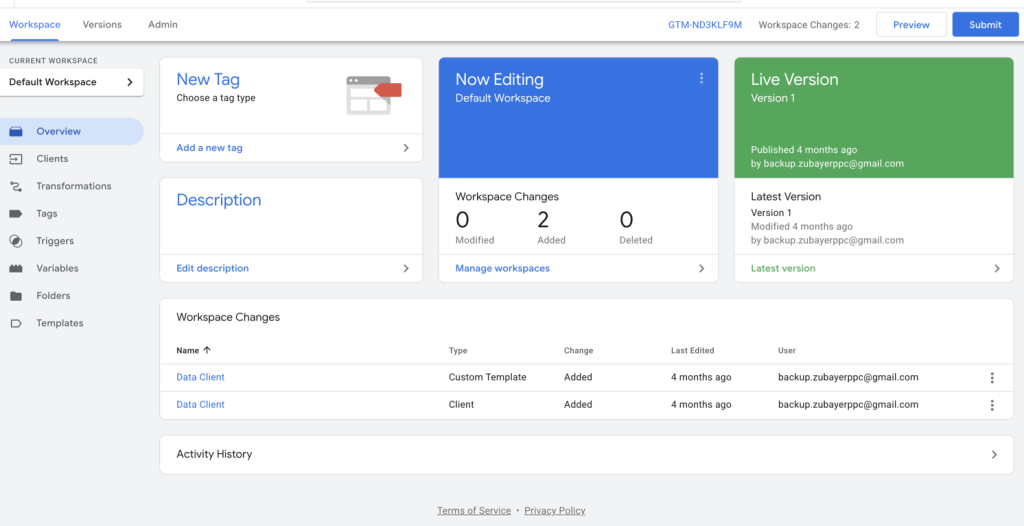
Step 1: Set Up GTM Web + Server Container
Create Web and Server containers inside Google Tag Manager.
Then connect the server container with Stape.
Step 2: Send Data from Web to Server
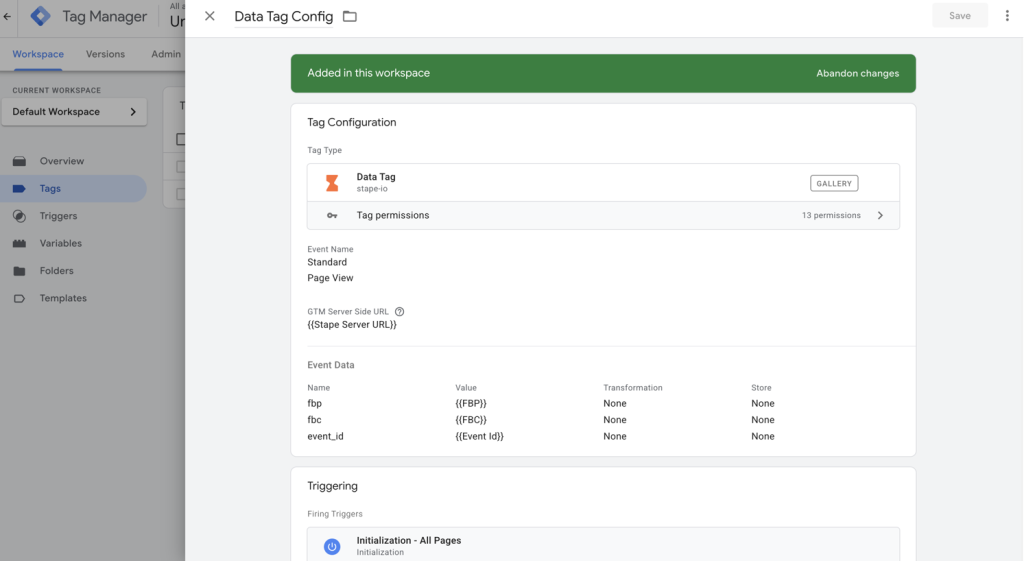
Send events using GA4/Data Tag.
Additionally, include user data such as email and phone.
PART 2 – Send User-Provided Hashed Data
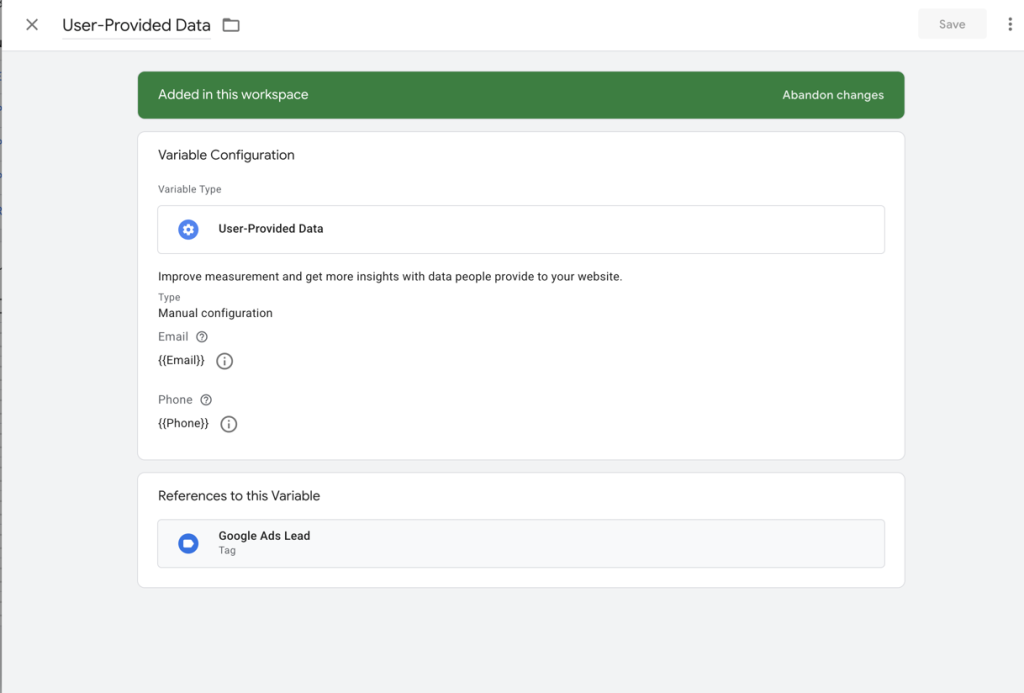
To improve tracking accuracy and attribution, you should send first-party user data (hashed) along with your conversion events.
User Data to Capture
• Email
• Phone number
• First name / Last name (optional)
• Address or external ID (optional but powerful)
Data Processing Standard
• First, hash all personal data using SHA-256 before sending
• Additionally, ensure compliance with privacy policies such as GDPR and CAPI best practices
PART 3 – CRM Offline Conversion Tracking
Step 3: Connect CRM with Website
Integrate HubSpot or another CRM with your website forms.
As a result, all leads will be stored inside the CRM system.

Step 4: Map Lifecycle Stages
Raw Lead
Sales Qualified Lead
Customer (Sale)
PART 4 – Full Funnel Tracking System
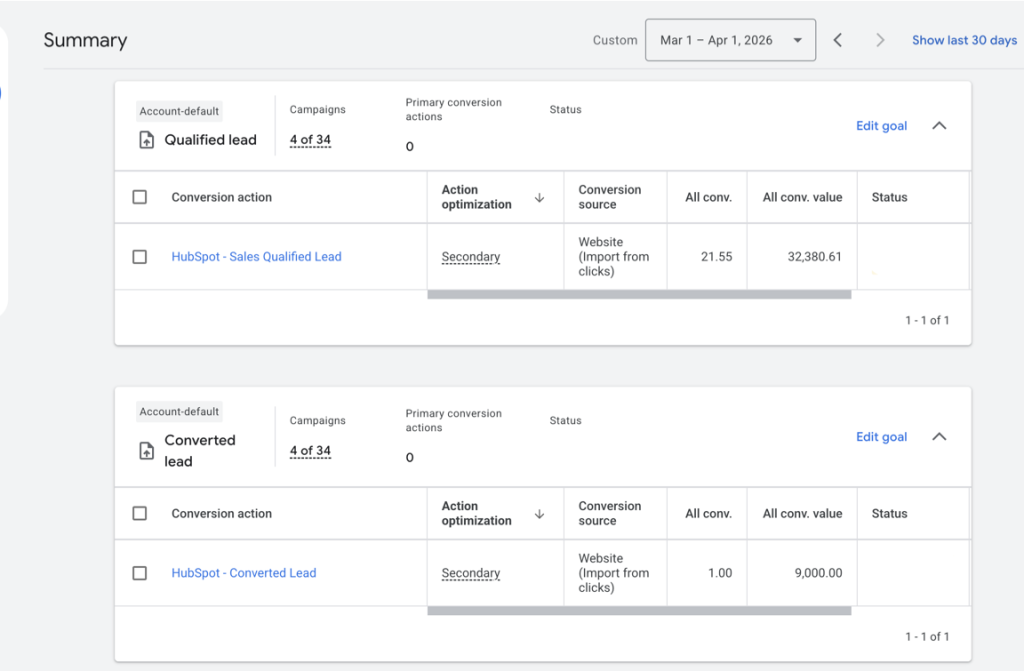
Step 5: First, Send Raw Lead (Online Conversion)
Form submission → Google Ads
Then, Send Qualified Lead (Offline Conversion)
CRM stage → SQL → send to Google Ads
Finally, Send Revenue (Final Conversion)
Closed deal → send revenue value
Comparison: Basic vs Future Proof Tracking
| Feature | Basic Tracking | Future Proof Tracking |
|---|---|---|
| Tracks Form Fills | ✅ Yes | ✅ Yes |
| Tracks Qualified Leads | ❌ No | ✅ Yes |
| Tracks Sales Revenue | ❌ No | ✅ Yes |
| CRM Attribution | ❌ No | ✅ Yes |
| Server-Side Data | ❌ No | ✅ Yes |
| Ad Optimization Quality | Low | High |
| Long-Term Stability | Weak | Strong |
Tracking Overview
Most businesses only track surface-level conversions. A future-proof system tracks the full journey from click → lead → qualification → sale → revenue, giving clearer attribution and better campaign decisions.
Real Use Case
A home services business running Google Ads with HubSpot CRM implemented this full funnel tracking setup.
Before: zero visibility into qualified leads or closed deals.
After 60 days:
- Cost per qualified lead dropped 38%
- 3 underperforming campaigns identified and paused, saving $1,800/month
- Revenue per campaign visible in Google Ads
- Smart Bidding shifted toward closed deals
For CRM lead attribution systems, explore How to Set Up Google Ads Offline Conversion Tracking with HubSpot CRM (Complete Guide 2026).
Common Mistakes
• Tracking only form submissions
• Ignoring CRM pipeline stages
• No offline conversion imports
• No server-side backup tracking
• Poor UTM source tracking
• No revenue reporting dashboard
Pro Tips
• Optimize campaigns using qualified leads, not all leads.
• Import sales revenue when possible.
• Use first-party server-side tracking.
• Keep UTMs clean and consistent.
• Review attribution monthly.
• Explore Google Ads First Party Server-Side Tracking with GTM & Stape (Complete Setup Guide 2026).
Frequently Asked Question
What is future-proof conversion tracking?
Future-proof conversion tracking is a modern measurement system that continues working accurately despite browser restrictions, iOS
privacy updates, ad blockers and cookie limitations. Instead of relying only on browser-based pixels, it combines server-side tracking, first-party CRM data, offline conversion imports and revenue attribution into one connected system. The goal is to give ad platforms like Google Ads and Meta accurate optimization signals based on real business outcomes rather than surface-level form fills. Businesses with future-proof tracking make better budget decisions, scale more confidently and prove ROI to clients with real data.
Why is my conversion tracking inaccurate?
Most conversion tracking setups are inaccurate because they rely entirely on browser-based pixels that are regularly blocked by Safari ITP, iOS restrictions and ad blockers. When a pixel is blocked, the conversion never reaches Google Ads or Meta, meaning campaigns optimize on an incomplete picture of actual performance. Additional accuracy issues come from missing GCLID attribution in the CRM, duplicate conversion actions counting the same lead multiple times, and attribution window mismatches between platforms. A server-side tracking layer via Stape, combined with proper CRM integration, fixes all of these issues simultaneously.
What is full funnel tracking?
Full funnel tracking is the process of measuring the complete customer journey from the first ad click through to a closed sale and actual revenue value inside your ad platform. Rather than only tracking when someone submits a form, full funnel tracking captures every meaningful stage: raw lead, sales qualified lead, closed deal and revenue value. Each stage is sent back to Google Ads or Meta as a separate conversion event so campaigns can optimize toward the leads most likely to close, not just the ones most likely to fill out a form. This transforms your ad platform from a lead generation tool into a true revenue generation tool.
Do I need a CRM for this setup?
Yes, a CRM is essential for full funnel tracking because it is the only place where lead quality, lifecycle stages, and deal values are recorded after the initial form submission. Without a CRM, you have no way to know which leads became qualified opportunities, which closed into customers, or what revenue each campaign actually generated. HubSpot, GoHighLevel, and Pipedrive all support offline conversion imports and can be connected to Google Ads to send lifecycle stage updates back to the platform automatically. The most important requirement is that your CRM captures and stores the GCLID at the point of form submission; without this, matching CRM events back to Google Ads clicks is impossible.
Does this improve Google Ads performance?
Yes, significantly. When Google Ads receives conversion signals based on qualified leads and closed revenue rather than raw form submissions, Smart Bidding has fundamentally better data to work with. Instead of optimizing toward the traffic most likely to fill out a form, the algorithm learns to find the traffic most likely to become a paying customer. Most businesses that implement full funnel tracking see a meaningful drop in cost per qualified lead within 30 to 60 days as Smart Bidding recalibrates to the stronger signals. The improvement compounds over time as Google Ads collects more revenue data and the algorithm becomes increasingly accurate at identifying high-value prospects.
Professional Conclusion
Conversion tracking is no longer just about counting leads — instead, it is about understanding revenue.
If your tracking system is not future-proof, you are making decisions based on incomplete data.
By implementing server-side tracking, enhanced conversions, CRM integration, and full funnel tracking, you gain complete visibility into your marketing performance.
Old tracking shows leads.
Future-proof tracking shows revenue.
On the other hand, if you want accurate tracking and better results from your ads, your system must be built for the future.
Therefore, upgrading your tracking setup is no longer optional — it is essential.
 Hire Me for Setup: WhatsApp Me
Book a Consultation: Schedule a Call