
Introduction
Additionally, if your conversion tracking is losing data, your ads are already wasting money.
However, most businesses believe they are tracking leads — in reality, they are missing the most important metric: revenue.
Therefore, solving this problem requires a future-proof conversion tracking system built on server-side tracking, enhanced conversions, CRM integration, and full funnel attribution.
✔ This system allows you to track:
➜ Accurate lead data without loss
➜ Google Ads conversions with higher match rate
➜ CRM lifecycle stages (Lead → SQL → Revenue)
➜ Privacy-safe first-party tracking
➜ Real ROI instead of guesswork
Lead → SQL → Revenue
What is Future-Proof Conversion Tracking? (Featured Snippet Optimized)
Future-proof conversion tracking is a system that uses server-side tracking, first-party data, CRM integration, and full funnel tracking to ensure accurate conversion and revenue measurement despite browser restrictions and privacy updates.
 Need Help?
 Hire Me for Setup: WhatsApp Me
Book a Consultation: Schedule a Call
Why Most Conversion Tracking Fails in 2026
✔ Browser restrictions block pixel data
✔ Ad blockers remove tracking scripts
✔ Leads are tracked but revenue is not
✔ CRM is not connected with ad platforms
✔ As a result, Google Ads optimizes using incomplete data
What Future-Proof Tracking Actually Means
Future-proof tracking is not just about collecting data — instead, it focuses on collecting the right data.
Moreover, this approach ensures long-term accuracy and scalability.
Additionally, it aligns with privacy-first tracking requirements.
✔ Server-side tracking
✔ First-party data
✔ CRM integration
✔ Full funnel tracking
Recommended Tracking Stack (2026)
✔ Google Tag Manager (Web + Server)
✔ Stape Server Container
✔ Google Ads Conversion Tracking
✔ GA4 Analytics
✔ CRM (HubSpot / Pipedrive)
Old vs Future-Proof Conversion Tracking (2026)
| Old Tracking System | Future-Proof Tracking System |
|---|---|
| Client-side tracking only (Pixel-based) | Server-side + CRM integrated tracking |
| Tracks basic form submissions only | Tracks full funnel (Lead → SQL → Revenue) |
| Cookie-dependent (data loss risk) | First-party data + privacy-safe tracking |
| Limited attribution accuracy | High-accuracy attribution with enriched data |
| No offline conversion tracking | CRM-based offline conversion tracking |
| No revenue visibility | Tracks actual revenue & deal value |
| Poor data for AI optimization | High-quality data for AI & Smart Bidding |
As a result, if you are still using outdated tracking methods, you are optimizing campaigns based on incomplete data.
Step-by-Step Implementation
PART 1 – Server-Side Tracking Setup
Step 1: Set Up GTM Web + Server Container
Create Web and Server containers inside Google Tag Manager.
Then connect the server container with Stape.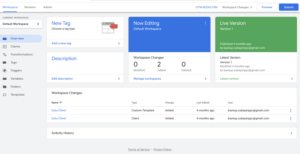
Step 2: Send Data from Web to Server
Send events using GA4/Data Tag.
Additionally, include user data such as email and phone.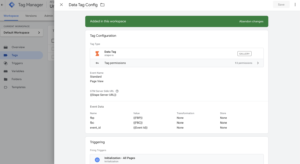
PART 2 – Send User-Provided Hashed Data
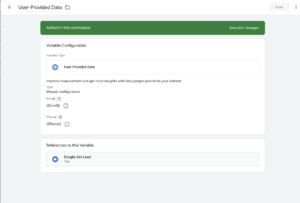
To improve tracking accuracy and attribution, you should send first-party user data (hashed) along with your conversion events.
User Data to Capture
• Email
• Phone number
• First name / Last name (optional)
• Address or external ID (optional but powerful)
Data Processing Standard
• First, hash all personal data using SHA-256 before sending
• Additionally, ensure compliance with privacy policies such as GDPR and CAPI best practices
PART 3 – CRM Offline Conversion Tracking
Step 3: Connect CRM with Website
Integrate HubSpot or another CRM with your website forms.
As a result, all leads will be stored inside the CRM system.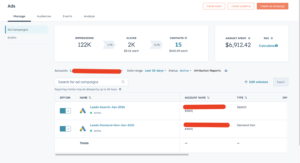
Step 4: Map Lifecycle Stages
Raw Lead
Sales Qualified Lead
Customer (Sale)
PART 4 – Full Funnel Tracking System
Step 5: Send Raw Lead (Online Conversion)
Form submission → Google Ads
Step 6: Send Qualified Lead (Offline Conversion)
CRM stage → SQL → send to Google Ads
Step 7: Send Revenue (Final Conversion)
Closed deal → send revenue value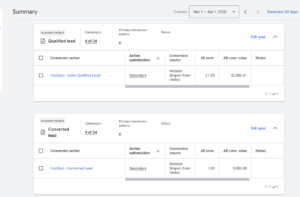
Data Flow Architecture
Browser → GTM → Server → CRM → Google Ads
Testing & Verification
✔ Check GTM Preview Mode
✔ Then verify events in GA4 DebugView
✔ Next, check Google Ads conversion status
✔ Finally, confirm CRM data sync
Professional Insight
The biggest mistake businesses make is tracking leads but not tracking revenue.
Therefore, without revenue tracking, Google Ads cannot optimize campaigns effectively.
As a result, scaling becomes difficult and inefficient.
Why This System Increases Revenue
✔ Better data improves optimization
✔ Moreover, higher match rates increase conversions
✔ Additionally, full funnel visibility improves decision-making
✔ As a result, accurate attribution reduces wasted ad spend
Client Qualification Section
✔ Google Ads conversions are inaccurate
✔ Additionally, you don’t know which campaign generates revenue
✔ Moreover, your CRM is not connected with ads
✔ Finally, tracking breaks due to privacy updates
Consequently, if these issues exist, your business is losing money every day.
What I Offer
✔ Server-side tracking setup
✔ Google Ads enhanced conversions
✔ CRM integration (HubSpot / Pipedrive)
✔ Full funnel tracking (Lead → Revenue)
✔ Tracking audit and fixing
Book a Free Tracking Audit
Eventually, if your tracking system is not future-proof, you are losing real revenue — not just data.
Therefore, taking action now will protect your ad performance and ROI.
Book a Free Strategy Call
Message me on WhatsApp
Frequently Asked Questions
What is future-proof conversion tracking?
It uses server-side tracking, CRM integration, and first-party data to ensure accurate conversion tracking despite privacy changes.
Why is my conversion tracking inaccurate?
Client-side tracking is often blocked by browsers and ad blockers. As a result, data loss occurs.
What is full funnel tracking?
It tracks the entire journey from lead → qualified lead → revenue.
Do I need a CRM for this setup?
Yes. Without a CRM, you cannot track offline conversions or revenue accurately.
Does this improve Google Ads performance?
Yes. Better data improves optimization and reduces cost per acquisition.
Professional Conclusion
Conversion tracking is no longer just about counting leads — instead, it is about understanding revenue.
If your tracking system is not future-proof, you are making decisions based on incomplete data.
By implementing server-side tracking, enhanced conversions, CRM integration, and full funnel tracking, you gain complete visibility into your marketing performance.
Old tracking shows leads.
Future-proof tracking shows revenue.
On the other hand, if you want accurate tracking and better results from your ads, your system must be built for the future.
Therefore, upgrading your tracking setup is no longer optional — it is essential.
Hire Me for Setup: WhatsApp Me
Book a Consultation: Schedule a Call
