
Introduction
Many businesses generate leads through website forms, but the real value of those leads becomes visible only after they move through the sales pipeline. With Google Ads Offline Conversion Tracking with HubSpot CRM, you can send lead lifecycle data from HubSpot back to Google Ads and measure which campaigns generate qualified leads and real revenue.
By connecting HubSpot lifecycle stages with Google Ads conversion events, advertisers can track the complete lead journey:
Lead → Sales Qualified Lead → Converted Lead → Revenue
This setup allows Google Ads to optimize campaigns based on real business outcomes instead of just form submissions.
✔ This setup allows you to track:
➜ Raw leads from website form submissions
➜ Sales qualified leads from HubSpot lifecycle stages
➜ Final sales conversions
➜ Actual revenue value from deals
➜ Complete lead funnel visibility inside Google Ads
Prerequisites
Before starting, make sure you have:
✔ Website with a contact form
✔ HubSpot CRM connected to the website
✔ Google Ads account
✔ Lifecycle stages configured in HubSpot CRM
✔ Google Tag Manager installed for form tracking
 Need Help?
 Hire Me for Setup: WhatsApp Me
Book a Consultation: Schedule a Call
Step-by-Step Implementation
Step 1: Capture Lead from Website Form
Open the website where the contact form is located.
When someone submits the form, the lead information is sent to HubSpot Contacts.
The submitted lead appears inside HubSpot as a new contact record.
📸 Screenshot Here – Website Contact Form
Step 2: Raw Lead Appears in HubSpot CRM
After form submission, the lead appears inside HubSpot CRM.
The lifecycle stage for the contact is Raw Lead.
📸 Screenshot Here – HubSpot Raw Lead
Step 3: Send Raw Lead Conversion to Google Ads
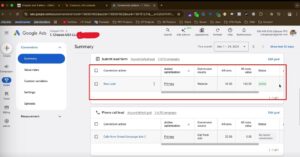
Raw leads are sent to Google Ads directly from the website form submission.
This conversion is sent using Google Tag Manager.
Step 4: Move Lead to Sales Qualified Stage
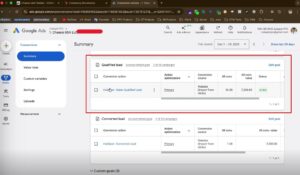
Inside HubSpot, when a deal is created for a contact, the lifecycle stage changes from Raw Lead to Sales Qualified Lead.
Step 5: Track Final Sale Conversion
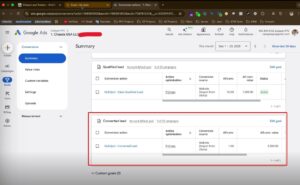
When the lead becomes a customer, the lifecycle stage changes to Sales.
At this stage Google Ads receives a conversion called Converted Lead.
Step 6: Send Revenue Value to Google Ads
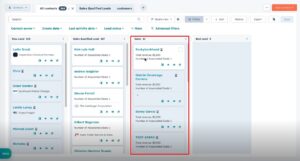
When the deal is closed, the deal value inside HubSpot is sent to Google Ads as the conversion value.
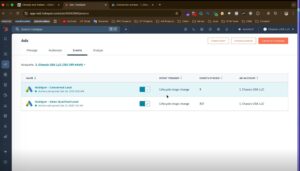
Step 7: Create Conversion Events in Google Ads
Inside Google Ads create conversion events that match the HubSpot lifecycle stages:
Raw Lead
Sales Qualified Lead
Converted Lead
Step 8: Match HubSpot Lifecycle with Google Ads
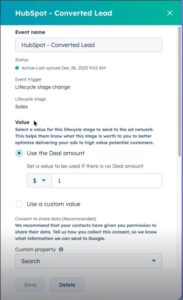
HubSpot lifecycle stages must match the conversion events created in Google Ads:
Raw Lead → Raw Lead Conversion
Sales Qualified Lead → Qualified Lead Conversion
Sales → Converted Lead
Step 9: Enable Enhanced Conversions
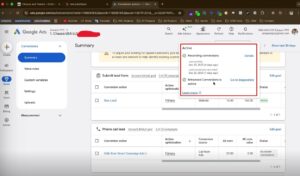
Enable Enhanced Conversions in Google Ads.
Step 10: Verify Conversion Data Quality
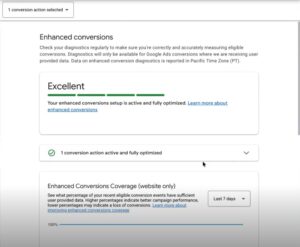
Check the conversion status in Google Ads.
You should see:
Conversion tracking working
Indexed conversions active
Imported data quality showing Excellent
Step 11: Test Offline Conversion Tracking
Submit a test lead from the website form.
Confirm the lead appears inside HubSpot Contacts.
Move the lead through the lifecycle stages:
Raw Lead → Sales Qualified Lead → Sales
Check Google Ads to confirm each stage appears as a conversion event.
Step 12: Final Publish
Ensure HubSpot and Google Ads integration is active.
Verify lifecycle stage conversions are syncing correctly.
✔ Google Ads Offline Conversion Tracking with HubSpot CRM is now active.
Professional Conclusion
After implementing this setup, you can track the full lead lifecycle inside Google Ads using HubSpot CRM data. This allows advertisers to measure campaign performance based on qualified leads, sales, and actual revenue instead of just form submissions.
By sending lifecycle stage updates from HubSpot back to Google Ads, businesses gain better visibility into their marketing performance and improve campaign optimization.
Facing problems for Google Ads Offline Conversion Tracking with HubSpot CRM ?
Hire Me for Setup: WhatsApp Me
Book a Consultation: Schedule a Call
