
Introduction
Accurate Squarespace Data Layer implementation is essential for ecommerce businesses that want reliable conversion tracking across Google Analytics 4, Google Ads, and Meta Pixel. However, many Squarespace stores rely on default platform tracking and fail to capture complete ecommerce purchase attribution data. As a result, conversion visibility becomes incomplete, optimization signals weaken, and advertising performance decisions become less reliable. Therefore, implementing a proper Squarespace ecommerce data layer is essential for accurate ecommerce attribution and stronger campaign optimization.
As a Stape Certified Partner, I specialize in building advanced ecommerce tracking systems using Google Tag Manager, custom ecommerce event architecture, GA4 ecommerce tracking, and server-side attribution systems. Therefore, this ensures accurate ecommerce data flow, stronger attribution accuracy, and reliable performance measurement across the complete ecommerce customer journey. Squarespace Data Layer helps ecommerce businesses connect purchase events, transaction values, product details, and customer interaction signals into a structured ecommerce tracking architecture for accurate attribution and conversion measurement.
In this guide, you’ll learn how to implement Squarespace Data Layer Setup using Google Tag Manager, custom ecommerce event tracking, and Squarespace Code Injection. As a result, you can track ecommerce purchases accurately, improve attribution reporting, and strengthen campaign optimization across multiple advertising platforms. For advanced tracking systems, explore Google Ads First-Party Server-Side Tracking with GTM & Stape and Meta Pixel & Conversion API Setup via GTM & Stape (Lead Event Tracking Tutorial).
🎥 Watch Now
Figure 1: Squarespace Ecommerce Tracking Flow (Squarespace → Data Layer → GTM → GA4 → Google Ads → Meta Pixel)
Struggling to track Squarespace ecommerce purchases accurately across GA4, Google Ads, and Meta Pixel?
Missing conversion events can break attribution, reduce optimization accuracy, and hurt advertising performance.
👉 WhatsApp: https://wa.me/8801735749155
👉 Book a Call: https://zcal.co/zubayerislam01/consultation
What Is a Squarespace Data Layer?
Squarespace Data Layer refers to implementing a structured JavaScript object that pushes ecommerce purchase data, transaction values, product details, checkout events, and customer interaction signals into Google Tag Manager. Then, Google Tag Manager captures this structured ecommerce event data and sends it into Google Analytics 4, Google Ads, Meta Pixel, and advanced attribution systems.
As a result, businesses gain stronger ecommerce attribution visibility, improved purchase tracking accuracy, and scalable ecommerce analytics architecture.
Why Is It Important?
Without proper Squarespace data layer implementation, ecommerce businesses often rely on incomplete native tracking that misses critical purchase attribution signals. However, effective ecommerce optimization depends on structured event architecture, reliable conversion delivery, and accurate ecommerce parameter mapping. Therefore, implementing a custom Squarespace GTM Data Layer is essential for accurate reporting and stronger campaign optimization.
- Track ecommerce purchases accurately
- Improve GA4 ecommerce reporting
- Strengthen Google Ads conversion attribution
- Support Meta Pixel purchase tracking
- Improve optimization signals
- Support future server-side tracking scalability
➡️ Google Analytics 4 Ecommerce Documentation.
Quick Answer
Squarespace Data Layer Implementation is completed by adding a custom ecommerce data layer script using Squarespace Code Injection, then configuring Google Tag Manager to capture ecommerce purchase events and forward them into Google Analytics 4, Google Ads, and Meta Pixel. As a result, ecommerce businesses gain accurate purchase attribution, stronger ecommerce reporting, and better campaign optimization.
Key Takeaways
- Squarespace native tracking may miss critical purchase data
- Custom data layer improves ecommerce tracking accuracy
- GTM enables flexible ecommerce event tracking
- GA4 depends on structured ecommerce event delivery
- Google Ads attribution improves with accurate purchase tracking
- Meta Pixel tracking becomes more reliable
- Server-side tracking readiness improves with clean data architecture
- GTM Preview Mode helps validate purchase events
- Better attribution improves campaign optimization
- Accurate tracking supports stronger ecommerce growth
Tools Used
- Squarespace
- Squarespace Code Injection
- Google Tag Manager
- Google Analytics 4
- Google Ads
- Meta Pixel
- GTM Preview Mode
- Google Tag Assistant
- Browser Developer Console
- Custom Ecommerce Data Layer Script
- Stape.io
➡️ Google Tag Manager Documentation
How the System Works
First, a custom Squarespace ecommerce data layer script is installed using Squarespace Code Injection, and ecommerce purchase events, transaction values, and product details are pushed into the browser data layer during customer interactions. Then, Google Tag Manager captures those structured ecommerce events and sends them to Google Analytics 4, Google Ads, and Meta Pixel for accurate purchase attribution. Finally, ecommerce businesses gain stronger attribution visibility, cleaner ecommerce reporting, and scalable ecommerce tracking for ongoing optimization.
Why It Matters
If ecommerce businesses rely only on default Squarespace tracking, purchase attribution may become incomplete, unreliable, and inconsistent. As a result, optimization decisions may depend on weak conversion signals, which can reduce advertising efficiency and distort reporting performance.
However, a properly implemented Squarespace custom data layer creates stronger ecommerce attribution confidence, cleaner reporting visibility, and more reliable optimization signals across analytics and advertising platforms.
Prerequisites
✔ Squarespace ecommerce store access
✔ Squarespace Code Injection access
✔ Google Tag Manager account
✔ Google Analytics 4 property
✔ Google Ads account
✔ Meta Pixel account (optional)
✔ GTM Preview Mode access
✔ Google Tag Assistant
✔ Browser console access for debugging
✔ Ecommerce tracking strategy
✔ Purchase event parameter mapping plan
✔ Conversion measurement framework
✔ Stape.io
Step-by-Step Implementation
Step 1: Add Google Tag Manager to Squarespace
Go to Squarespace Dashboard → Website → Settings → Advanced → Code Injection
Paste your GTM tracking script inside the <head> field
Click Save
Figure 2: Google Tag Manager Script Installation in Squarespace Code Injection

Step 2: Add Item Data Layer to the Squarespace Footer
Go to Squarespace Dashboard → Website → Settings → Advanced → Code Injection
Insert the item data layer script inside the <footer> field
Click Save
Figure 3: Squarespace Item Data Layer Script Installation in Footer Code Injection
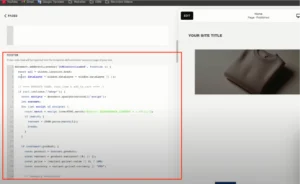
Step 3: Add Purchase Data Layer to the Order Confirmation Page
Navigate to: Squarespace Dashboard → Settings → Checkout → Order Confirmation Page
Insert this script:
Item Data Layer
Figure 4: Squarespace Purchase Data Layer Setup on Order Confirmation Page

Testing
Validate your Squarespace ecommerce tracking data layer before production launch to ensure accurate attribution across analytics and advertising systems.
Checklist:
✔ GTM container loads correctly
✔ custom data layer pushes successfully
✔ ecommerce purchase event detected
✔ GA4 purchase event validated
✔ Google Ads conversion confirmed
✔ Meta Pixel purchase event confirmed
✔ no duplicate transaction IDs
✔ currency values mapped accurately
✔ item arrays structured correctly
✔ checkout purchase values match platform totals
Final Publish Step
After successful testing, publish the GTM container and complete one final live purchase validation to reconfirm that all ecommerce conversion signals are working correctly.
As a result, your Squarespace Data Layer Implementation will begin sending accurate ecommerce purchase events, attribution signals, and conversion measurement data into GA4, Google Ads, and Meta Pixel.
Comparison: Default vs Custom Squarespace Data Layer Tracking
| Feature | Default Tracking | Custom Data Layer |
| Purchase Tracking Accuracy | ❌ Limited | ✅ Accurate |
| GA4 Ecommerce Reporting | ❌ Partial | ✅ Full |
| Google Ads Attribution | ❌ Weak | ✅ Strong |
| Meta Pixel Event Quality | ❌ Limited | ✅ Better |
| Custom Event Flexibility | ❌ Low | ✅ High |
| Checkout Data Visibility | ❌ Minimal | ✅ Strong |
| Server-Side Readiness | ❌ Weak | ✅ Strong |
| Event Architecture Control | ❌ Limited | ✅ Full |
Tracking Overview
This implementation uses Squarespace Code Injection, Google Tag Manager, and a custom Squarespace ecommerce data layer to capture purchase activity, checkout values, transaction metadata, and ecommerce interaction signals. Then, GTM routes structured conversion data into GA4, Google Ads, and Meta Pixel for accurate attribution measurement.
As a result, ecommerce businesses gain stronger reporting reliability, cleaner optimization signals, and scalable ecommerce analytics architecture.
Real Use Case
An ecommerce business selling digital and physical products through Squarespace implemented a custom Squarespace GTM Data Layer instead of relying on default platform tracking.
As a result:
- Purchase attribution accuracy improved
- GA4 ecommerce reporting became reliable
- Google Ads conversion measurement strengthened
- Meta Pixel purchase quality improved
- Optimization decisions became more data-driven
To implement similar architecture, follow Full Funnel Tracking for Google Ads using CRM, GTM & Stape.
Common Mistakes
- Installing GTM incorrectly inside Squarespace
- Broken custom data layer script syntax
- Incorrect ecommerce parameter naming
- Missing transaction IDs
- Duplicate purchase event firing
- GA4 purchase event misconfiguration
- Google Ads value mismatch
- Meta Pixel event parameter errors
- Skipping live purchase validation
- Incomplete checkout event testing
These issues can break attribution accuracy and reduce ecommerce optimization performance.
Pro Tips
- Always use unique transaction IDs to prevent duplicate reporting
- Standardize ecommerce parameter naming across all platforms
- Validate live purchases instead of relying only on preview mode
- Use browser developer tools for data layer debugging
- Plan future server-side tracking architecture from day one
- Document your event naming conventions clearly
Frequently Asked Question
What is a Squarespace Data Layer?
Squarespace Data Layer is a structured JavaScript implementation that sends ecommerce purchase events, transaction values, product details, and customer interaction data into Google Tag Manager. Then, GTM forwards this structured event data into GA4, Google Ads, Meta Pixel, and other analytics platforms for accurate ecommerce conversion tracking and attribution measurement.
Why do I need a custom Squarespace data layer?
A custom Squarespace data layer implementation improves ecommerce event accuracy, conversion visibility, and attribution reliability across multiple marketing platforms. Default tracking often provides incomplete ecommerce reporting or limited event control. Therefore, businesses needing accurate performance measurement should use structured ecommerce event architecture.
Can I track Squarespace purchases in GA4?
Yes, a properly configured Squarespace GA4 data layer allows Google Tag Manager to capture ecommerce purchase events and send structured transaction data into Google Analytics 4. As a result, businesses gain accurate ecommerce reporting, revenue visibility, and stronger purchase attribution analysis.
Does Squarespace support Google Ads conversion tracking?
Yes, Squarespace data layer for Google Ads conversion tracking can be implemented through Google Tag Manager using custom ecommerce purchase events. This allows Google Ads to receive accurate purchase values, transaction IDs, and conversion signals for stronger campaign optimization.
Can Meta Pixel track Squarespace ecommerce purchases?
Yes, the Squarespace data layer for Meta Pixel allows Meta to receive structured ecommerce purchase events through GTM. This improves purchase event quality, strengthens attribution reliability, and creates cleaner optimization signals for paid campaign performance.
Do I need Google Tag Manager for Squarespace ecommerce tracking?
Google Tag Manager is strongly recommended because it provides flexible tag management, ecommerce event mapping, conversion deployment, debugging capabilities, and scalable implementation control without repeatedly modifying site code.
Can Squarespace data layer support server-side tracking?
Yes, a clean Squarespace server-side tracking data layer creates strong architecture for future server-side implementations. Since server-side tracking depends on structured event quality, a properly designed ecommerce data layer improves long-term attribution durability.
Conclusion
Implementing Squarespace Data Layer correctly helps ecommerce businesses improve purchase attribution accuracy, ecommerce reporting reliability, and advertising optimization performance across Google Analytics 4, Google Ads, and Meta Pixel. Default platform tracking often creates incomplete conversion visibility and weak attribution signals. However, a custom Squarespace ecommerce data layer implementation creates structured ecommerce event architecture, cleaner analytics reporting, and stronger optimization confidence.
As a result, businesses gain better revenue measurement, more reliable conversion attribution, and scalable ecommerce tracking systems that support future growth.
➡️ Learn more: Unbounce Google Ads Enhanced Conversions Guide.
Ready to fix your Squarespace ecommerce tracking and improve conversion attribution accuracy?
Get a complete GTM + GA4 + Google Ads + Meta Pixel ecommerce tracking implementation built for accurate purchase measurement and scalable optimization.
👉 WhatsApp: https://wa.me/8801735749155
👉 Book a Call: https://zcal.co/zubayerislam01/consultation
