
Introduction
Squarespace Form Tracking is essential for businesses that rely on accurate lead measurement and performance optimization. However, native Squarespace triggers often fail to capture AJAX-based form submissions, resulting in incomplete or inaccurate data.
As a Stape Certified Partner, I’ve implemented this exact setup for 50+ agencies and businesses worldwide — and this guide covers every step you need to get it right the first time.
➡️ Google Tag Manager enables advanced tracking by capturing form submissions through custom scripts and structured data layers.
If you’re building a complete tracking system, you should explore Full Funnel Tracking for Google Ads using CRM, GTM & Stape to understand how data flows across platforms.
This guide provides a structured, step-by-step framework for implementing advanced Squarespace form tracking using Google Tag Manager (GTM), ensuring accurate reporting in GA4 and Google Ads.
With this implementation, you will achieve:
⤇ Advanced Squarespace form event tracking
⤇ Structured GTM-based tracking architecture for Squarespace
⤇ Accurate Squarespace conversion tracking
⤇ Squarespace GA4 form tracking via GTM
⤇ Squarespace Google Ads conversion tracking setup
⤇ Google Ads Enhanced Conversions implementation
⤇ Reliable data transmission to GA4 and Google Ads for precise attribution
🎥 Watch Now
Figure: Squarespace Form Tracking Setup Using GTM
Struggling to track Squarespace form submissions accurately?
I help businesses implement advanced Squarespace form tracking systems using GTM, GA4, and Google Ads for precise attribution and improved ROAS.
👉 WhatsApp: https://wa.me/8801735749155
👉 Book a Call: https://zcal.co/zubayerislam01/consultation
What Is Advanced Squarespace Form Tracking?
Advanced Squarespace form tracking is the process of capturing successful Squarespace form submissions using a custom form listener and Data Layer events through Google Tag Manager. This setup sends accurate conversion data to Google Analytics 4 and Google Ads.
Why Is It Important?
Default form tracking often misses submissions or sends incomplete data. Advanced listener-based tracking helps businesses measure real leads and optimize campaigns using accurate conversion signals.
• Measure real form submissions
• Improve Google Ads smart bidding
• Track leads inside GA4
• Reduce wasted ad spend
• Improve attribution accuracy
Quick Answer
Advanced Squarespace form tracking with GTM works by deploying a custom JavaScript Form Listener that detects AJAX-based form submissions and pushes a structured event into the GTM Data Layer. Google Tag Manager then fires conversion tags that send accurate data to GA4 and Google Ads. This ensures reliable lead tracking even when native Squarespace triggers fail to capture form submissions.
Key Takeaways
- A custom GTM Form Listener is required for Squarespace because native triggers cannot reliably detect AJAX-based form submissions on Squarespace websites.
- Structuring form submission data in the GTM Data Layer enables accurate tracking across GA4, Google Ads, and any other connected analytics platform.
- Enabling Google Ads Enhanced Conversions with hashed email data improves conversion match rate and attribution accuracy for Squarespace lead generation campaigns.
- Testing with GTM Preview Mode and GA4 DebugView before publishing ensures the entire tracking chain is working correctly end to end.
Tools Used in This Setup
• Squarespace Website
• Google Tag Manager
• Google Analytics 4
• Google Ads
• Custom JavaScript Form Listener
• Data Layer Events
• GTM Preview Mode
How the System Works (Simple Flow)
- A visitor lands on the Squarespace page.
- The visitor submits the form.
- The custom listener detects successful submission.
- An event is pushed into the Data Layer.
- Google Tag Manager fires GA4 and Google Ads tags.
- Conversion data is recorded for reporting and optimization.
Why It Matters
Without accurate form tracking, ad platforms optimize with incomplete data. Listener-based Squarespace tracking improves attribution, reduces wasted spend, and helps scale profitable campaigns.
Prerequisites
Before starting, ensure you have:
✔ Squarespace website with an active form
✔ Google Tag Manager installed
✔ Custom Form Listener script implemented
✔ Google Ads conversion action created
✔ GA4 property configured
✔ stape.io
Before proceeding, ensure GTM is properly installed. Refer to How to Add Google Tag Manager on BigCommerce for step-by-step instructions.
Step-by-Step Implementation
PART 1 – Verify Squarespace GTM Tracking
Step 1: Confirm Google Tag Manager Installation
Open your Squarespace page.
Open GTM → Click Preview → Connect the site.
Confirm that Preview mode is connected.
Figure 1: GTM Preview Connected

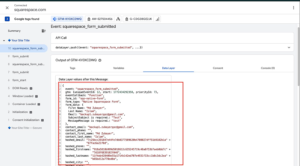
Step 2: Validate Squarespace Form Listener
Submit the form.
Open GTM Preview → Data Layer tab.
Confirm that the custom event lead appears.
Figure 2: Data Layer Event Verification
PART 2 – Configure Squarespace Conversion Tracking Trigger
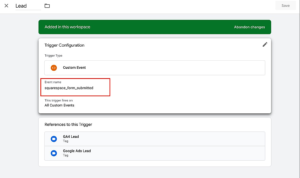
Step 3: Create Custom Event Trigger
Create a new trigger.
Trigger Type: Custom Event
Event Name: lead
Save.
Figure 3: Custom Event Trigger
Step 4: Create Data Layer Variables
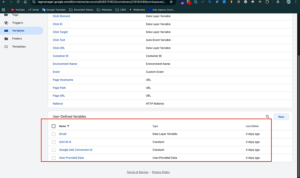
Create a new variable:
Variable Type: Data Layer Variable
Name: hashed_email
Save.
Create additional variables if required:
- first_name
- last_name
- email_address
Figure 4: Data Layer Variables
PART 3 – Squarespace Google Ads Conversion Tracking
Step 5: Create Conversion Action in Google Ads
Inside Google Ads:
- Create a new conversion action
- Conversion Goal: Squarespace Form Submission
- Enable Google Ads Enhanced Conversions
- Click Save
Copy the following details:
- Conversion ID
- Conversion Label
Step 6: Create Conversion ID Variable in GTM
Create a Constant Variable.
Name: Google Ads Conversion ID
Value: AW-XXXXXXXX
Click Save.
Step 7: Configure Required Tags
A) Google Tag (Configuration)
Create a new tag.
Tag Type: Google Tag.
Enter Conversion ID.
Trigger: All Pages.
Save.
B) Conversion Linker
Create a new tag.
Tag Type: Conversion Linker.
Trigger: All Pages.
Save.
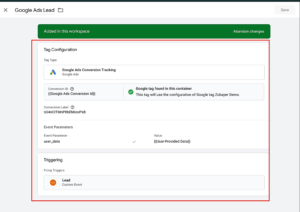
C) Google Ads Conversion Tracking
Create a new tag.
Tag Type: Google Ads Conversion Tracking.
Conversion ID: {{Google Ads Conversion ID}}
Conversion Label: From Google Ads
Trigger: lead
Enable Enhanced Conversions.
Add User Provided Data → Email: {{hashed_email}}
Save.
➡️ Google Ads conversion tracking ensures accurate attribution and performance measurement.
To expand booking and appointment tracking, explore How to Track Breely Bookings with GTM & Google Ads.
Figure 5: Google Ads Conversion Tag
PART 4 – Squarespace GA4 Form Tracking GTM Setup
Step 8: Create GA4 Measurement ID Variable
Create a Constant Variable.
Name: GA4 Measurement ID
Value: G-XXXXXXXX
Click Save.
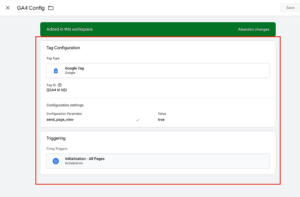
Step 9: Create GA4 Config Tag
Create a new tag.
Tag Type: Google Tag
Measurement ID: {{GA4 Measurement ID}}
Trigger: All Pages
Save.
Figure 6: GA4 Configuration Tag
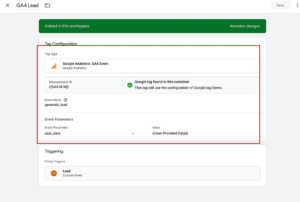
Step 10: Create GA4 generate_lead Event
Create a new tag.
Tag Type: GA4 Event
Measurement ID: {{GA4 Measurement ID}}
Event Name: generate_lead
Trigger: lead
Save.
For additional form tracking implementations, read How to Track WPForms Conversion with GTM and GA4.
Figure 7: GA4 Lead Event
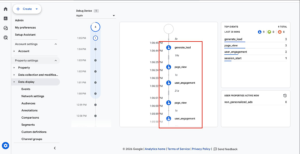
Testing Squarespace Form Tracking Using GTM
⤇ Open GTM Preview
⤇ Open GA4 DebugView
⤇ Reload the page
⤇ Submit the form
Confirm the following events fire correctly:
⤇ Lead event triggers
⤇ Google Ads conversion tag fires
⤇ generate_lead event is received in GA4
Figure 8: GA4 DebugView
Comparison: Default vs Advanced Squarespace Tracking
| Feature | Default Tracking | Listener + Data Layer Tracking |
|---|---|---|
| Detects Successful Submissions | ❌ Limited | ✅ Accurate |
| Google Ads Conversion Tracking | ❌ Weak | ✅ Reliable |
| GA4 Event Accuracy | ❌ Inconsistent | ✅ Strong |
| Data Layer Support | ❌ No | ✅ Yes |
| Attribution Accuracy | ❌ Low | ✅ High |
| Scaling Performance | ❌ Weak | ✅ Better |
Tracking Overview
Squarespace forms may not always provide clean native tracking signals. Using a custom listener and Data Layer events allows Google Tag Manager to capture accurate form submissions and pass conversion data to GA4 and Google Ads.
Real Use Case
A service business running Google Ads on a Squarespace landing page was missing lead conversions.
After implementing listener-based form tracking:
• Real form submissions were tracked accurately
• Google Ads optimization improved
• Cost per lead decreased
• GA4 reporting became reliable
Common Mistakes
- Not implementing a custom form listener
- Incorrect event naming in GTM
- Missing Conversion Linker tag
- Incorrect data layer variables
- Not testing in GTM Preview mode
Pro Tips
- Use structured data layers for scalable tracking.
- Enable Enhanced Conversions for improved attribution.
- Implement server-side tracking for future-proof accuracy.
- Validate events using GA4 DebugView before publishing.
To future-proof your tracking setup, consider implementing Google Ads First-Party Server-Side Tracking with GTM & Stape.
Frequently Asked Questions
What is Squarespace form tracking with GTM?
Squarespace form tracking with GTM is the process of using a custom JavaScript Form Listener and GTM Data Layer to capture form submission events and send them to GA4 and Google Ads for accurate conversion reporting.
Why do native Squarespace triggers fail?
Squarespace uses AJAX-based form submissions which do not trigger standard page load or DOM-ready events. A custom Form Listener script is required to detect these submissions reliably across all Squarespace forms.
Can I track Squarespace forms in GA4?
Yes. Using GTM you can push a generate_lead event to GA4 whenever a Squarespace form is submitted. This gives you full visibility into form conversion performance inside Google Analytics 4.
Do I need Enhanced Conversions for Squarespace tracking?
Enhanced Conversions are not mandatory but strongly recommended. They send hashed user data such as email to Google Ads, improving conversion match rate and attribution accuracy significantly.
How do I test Squarespace form tracking in GTM?
Use GTM Preview Mode to connect your website, submit a test form, and confirm the lead event appears in the Data Layer tab. Then verify the Google Ads and GA4 tags fired correctly before publishing the container.
Conclusion
Implementing advanced Squarespace form tracking using a custom form listener and data layer ensures accurate, reliable, and scalable conversion tracking. This setup enables precise reporting in GA4 and Google Ads, improves attribution, and enhances marketing performance.
Want to implement Squarespace form tracking correctly?
I can help you set up a complete tracking system for accurate data, better attribution, and improved campaign performance.
👉 WhatsApp: https://wa.me/8801735749155
👉 Book a Call: https://zcal.co/zubayerislam01/consultation
