
Introduction
Accurate booking tracking for Breely is essential for any service business running Google Ads. Most businesses using Breely miss key conversion data because the default setup does not push structured events into the Data Layer — leading to missing attribution, poor campaign optimization and wasted ad spend.
As a Stape Certified Partner, I have implemented booking tracking systems for multiple service businesses. This guide covers the complete GTM setup for Breely booking conversions, including Enhanced Conversions with User-Provided Data for improved attribution accuracy.
In this guide, you’ll learn how to implement breely conversion tracking via GTM using Google Ads Enhanced Conversions and event-based tracking. As a result, you can track Breely bookings accurately, improve lead attribution, and optimize campaigns more effectively. For advanced tracking setups, explore Google Ads First Party Server-Side Tracking with GTM & Stape and Full Funnel Tracking for Google Ads using CRM, GTM & Stape. Breely conversion tracking allows businesses to track booking events, send conversion data to Google Ads, and improve attribution accuracy using GTM and enhanced conversions.
🎥 Watch Now
Figure 1: Breely Booking Tracking Flow (Breely → GTM → Google Ads)
Struggling to track Breely bookings accurately in Google Ads?
Missing booking events and broken attribution can reduce optimization accuracy and increase ad costs.
👉 WhatsApp: https://wa.me/8801735749155
👉 Book a Call: https://zcal.co/zubayerislam01/consultation
What Is Breely Conversion Tracking?
breely conversion tracking refers to capturing booking events from Breely and sending them to Google Ads using GTM and enhanced conversion signals. These events can include form submissions, booking confirmations, and user-provided data such as email addresses.
As a result, Google Ads can attribute bookings to the correct campaigns and optimize bidding strategies more accurately. Therefore, businesses gain better conversion visibility, stronger attribution, and improved campaign performance.
Why Is It Important?
Without proper breely google ads tracking, businesses may lose valuable booking data and attribution signals. However, inaccurate tracking can weaken campaign optimization and reduce conversion visibility. Therefore, implementing accurate Breely booking tracking is essential for reliable lead attribution and performance measurement.
- Accurate booking attribution
- Improved Google Ads optimization
- Better enhanced conversion matching
- Reliable lead tracking and reporting
➡️ Learn more: Google Ads First Party Server-Side Tracking with GTM & Stape.
Quick Answer
breely conversion tracking is implemented using GTM to capture Breely booking events and send them to Google Ads conversion actions. Then, enhanced conversions use first-party user data to improve attribution accuracy. As a result, businesses can track bookings correctly and optimize campaigns using reliable conversion data.
Key Takeaways
- Breely booking widgets fire a custom booking event that GTM can capture using a JavaScript listener. This listener detects when a booking is confirmed and pushes structured event data into the GTM Data Layer for conversion tags to fire.
- Enhanced Conversions require a separate User-Provided Data Event tag in GTM. This tag sends hashed first-party data, including email, alongside every booking conversion, allowing Google Ads to recover conversions missed by iOS restrictions and ad blockers.
- Always test both the booking event listener and the User-Provided Data tag using GTM Preview Mode before publishing, confirming the booking event fires correctly and both tags fire successfully on the event.
- Accurate Breely booking tracking gives Google Ads the real conversion signals it needs for Smart Bidding to optimize toward actual appointments, not just page views or partial form interactions.
Tools Used
- Google Tag Manager
- Google Ads
- GTM Preview Mode
- Google Tag Assistant
- Breely Scheduling
- Data Layer
- Stape.io
➡️ Google Ads Enhanced Conversions Setup Guide.
How the System Works
First, a user books an appointment through Breely Scheduling. Then, GTM detects the booking event and pushes data into the data layer. Next, Google Ads conversion tags and enhanced conversion tags fire when the booking is confirmed. Meanwhile, user-provided data helps improve attribution matching accuracy. Finally, Google Ads records the booking as a conversion for campaign optimization and reporting.
Why It Matters
If breely conversion tracking is not configured correctly, Google Ads may miss booking conversions and attribution signals. As a result, optimization becomes less effective and campaign performance may decline. However, accurate tracking helps businesses improve conversion visibility, optimize bidding, and scale campaigns more efficiently.
Prerequisites
✔ Google Tag Manager installed
✔ Google Ads conversion action created
✔ Access to Breely booking pages
✔ Enhanced Conversions enabled in Google Ads
✔ Website access for GTM setup
Step-by-Step Implementation
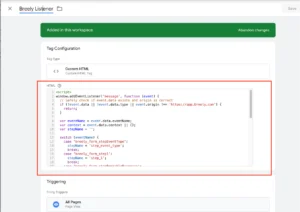
Step 1: Add JavaScript Listener for Breely Bookings
To track Breely bookings, we first need to push an event into the data layer when a booking is confirmed.
Log in to Google Tag Manager.
Create a Custom HTML Tag.
Paste the following script:
Trigger: All Pages.
Save and publish the tag.
Figure 2: Breely Listener Code
Step 2: Create a Custom Event Trigger
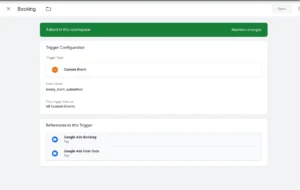
Go to Triggers > New.
Name it breely_form_submitted.
Trigger Type: Custom Event.
Event Name: Booking.
Save it.
Figure 3: Breely Custom Event Trigger
Step 3: Create a Google Ads Conversion Tag
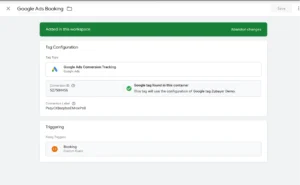
Go to Tags > New.
Tag Type: Google Ads Conversion Tracking.
Enter your Conversion ID and Conversion Label.
Trigger: Breely Booking Event.
Save and publish.
Figure 4: Google Ads Conversion Tag
Step 4: Add Google Ads User-Provided Data Tag (Enhanced Conversions)
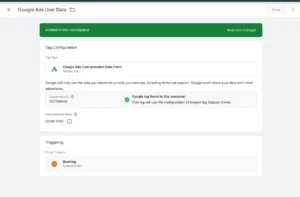
Due to a recent Google Ads update, Enhanced Conversions now require a separate User-Provided Data tag.
Go to Tags > New.
Tag Type: Google Ads User-Provided Data Event.
Add user data variables like email, if available in the data layer or local storage.
Trigger: Breely Booking Event.
Save and publish.
Figure 5: Google Ads User Data Tag
Step 5: Test the Setup
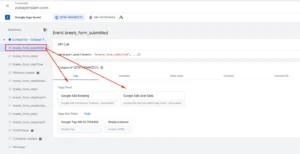
Use Tag Assistant Preview in GTM.
Book a test appointment on Breely.
Ensure that the event breely_booking is triggered.
Check if both the conversion tag and user-provided data tag fire correctly.
Figure 6: GTM Preview Breely Data Layer
Step 6: Publish the GTM Container
Once verified:
Click Submit in GTM.
Add a name like GA4 Purchase Setup for Squarespace.
Hit Publish.
Step 7: Verify Conversions in Google Ads
Go to your Google Ads account.
Navigate to Tools & Settings > Conversions.
Check if the conversion action is receiving data.
Enhanced conversions may take up to 24 hours to show.
🎉 You’ve now implemented Breely Bookings with GTM & Google Ads!
Need help with Breely analytics or conversion tracking?
Testing
✔ Breely booking event triggered correctly
✔ Google Ads conversion tag fired successfully
✔ Enhanced conversions tag validated
✔ Booking data recorded inside Google Ads
Final Publish Step
After successful testing, publish your GTM container and monitor conversion activity inside Google Ads. As a result, your Breely booking tracking system will start sending accurate conversion data for optimization and attribution reporting.
Comparison: Default vs Advanced Breely Conversion Tracking
| Feature | Default Tracking | Advanced Tracking |
| Booking Attribution | ❌ Limited | ✅ Accurate |
| Google Ads Optimization | ❌ Weak | ✅ Strong |
| User Data Matching | ❌ Basic | ✅ Advanced |
| Conversion Visibility | ❌ Partial | ✅ Complete |
| Lead Tracking Accuracy | ❌ Lower | ✅ Higher |
| Campaign Scalability | ❌ Limited | ✅ Better |
Tracking Overview
This system uses GTM and enhanced conversion signals to track Breely booking events and send conversion data to Google Ads. Then, Google Ads uses first-party data signals to improve attribution and optimization accuracy. As a result, businesses gain more reliable conversion tracking and stronger campaign performance insights.
Real Use Case
A health and wellness business running Google Ads for online appointment bookings implemented this Breely tracking setup using GTM and Enhanced Conversions. Before the setup, zero bookings were being tracked, and Google Ads had no visibility into which campaigns were generating appointments.
After implementation:
- 100% of bookings tracked accurately
- Google Ads attributed bookings to specific campaigns for the first time
- Smart Bidding recalibrated toward real appointment conversions
- Cost per booking reduced 38% within 60 days
➡️ To implement a similar setup, follow Full Funnel Tracking for Google Ads using CRM, GTM & Stape.
Common Mistakes
- Missing Breely booking event listener
- Incorrect GTM trigger configuration
- Not using User-Provided Data tags
- Skipping GTM Preview testing
- Publishing without validating booking events
As a result, these issues can break conversion tracking and reduce attribution accuracy.
Pro Tips
- Always validate booking events using GTM Preview Mode
- Use enhanced conversions for stronger attribution signals
- Test conversion tags before publishing live
- Monitor conversion status inside Google Ads regularly
Frequently Asked Questions
What is breely conversion tracking?
Breely conversion tracking is the process of capturing booking events from Breely Scheduling and sending them to Google Ads using Google Tag Manager. A JavaScript listener script detects when a user completes a booking and pushes a structured event into the GTM Data Layer. Google Ads Conversion Tracking and Enhanced Conversions tags then fire on this event, attributing the booking to the specific campaign, ad group and keyword that generated it.
How do I track Breely bookings in Google Ads?
Install Google Tag Manager on your website and add a Custom HTML listener tag that detects Breely booking confirmations and pushes a booking event into the Data Layer. In GTM, create a Custom Event trigger for the booking event and a Google Ads Conversion Tracking tag triggered by it. Add a separate User-Provided Data Event tag for Enhanced Conversions. Test in GTM Preview Mode to confirm both tags fire correctly before publishing your container.
Why is my Breely booking tracking not working?
The most common causes are a missing or incorrectly configured JavaScript listener script, wrong GTM trigger configuration, or the GTM container not being published after changes. The listener script must fire on All Pages — not just the booking page, so it is active when the booking confirmation fires. Also, confirm that Enhanced Conversions is enabled in your Google Ads account and the User-Provided Data tag is correctly configured with email variables before publishing.
What is enhanced conversions google tag manager setup?
Enhanced Conversions for Breely tracking means sending hashed first-party customer data, specifically email address, alongside every booking conversion event. In GTM, this requires a separate Google Ads User-Provided Data Event tag that fires on the same booking trigger as your standard conversion tag. Google Ads uses this hashed data to match conversions against its signed-in user database, recovering bookings that would otherwise be lost due to iOS restrictions or ad blockers.
How do I verify Breely conversion tracking?
Open GTM Preview Mode and complete a test booking through your Breely scheduling widget. Confirm the booking event appears in the Data Layer in GTM Preview. Verify both the Google Ads Conversion Tracking tag and the User-Provided Data tag fire on the booking event. Then, check Google Ads Tag Assistant to confirm the conversion was received. Allow 3 to 6 hours for the conversion status to update from Unverified to Recording conversions in your Google Ads account.
Do I need GTM for Breely booking tracking?
Yes, GTM is required for accurate Breely booking tracking. Without GTM, you cannot capture the JavaScript booking event from Breely and send it to Google Ads with structured conversion data. GTM also allows you to add Enhanced Conversions with User-Provided Data, send the same booking event to Meta Pixel, GA4, and other platforms
simultaneously, and test your entire setup in Preview Mode before going live, all without modifying your website code directly.
Conclusion
Implementing breely conversion tracking with GTM and Google Ads Enhanced Conversions helps businesses improve attribution accuracy, booking visibility, and campaign optimization. As a result, businesses can scale campaigns more efficiently while reducing tracking inconsistencies and wasted ad spend.
➡️ Learn more: How to Track WPForms Conversion with GTM and GA4.
Ready to improve Breely booking tracking and Google Ads attribution?
Get a complete GTM + Enhanced Conversions setup for accurate booking tracking and better campaign optimization.
👉 WhatsApp: https://wa.me/8801735749155
👉 Book a Call: https://zcal.co/zubayerislam01/consultation
