
Introduction
GoHighLevel booking widgets are typically embedded as iframe calendars, making it difficult for default browser-based tracking to detect appointment submissions. Without proper tracking, businesses lose valuable conversion data, leading to inaccurate reporting and inefficient campaign optimization.
By implementing GoHighLevel Booking Tracking with GTM, you can accurately capture appointment bookings and send conversion data to Google Ads and Google Analytics 4 (GA4).
➡️ Google Tag Manager enables advanced tracking through custom scripts and structured Data Layer integrations:
If you’re building a complete tracking ecosystem, explore Full Funnel Tracking for Google Ads using CRM, GTM & Stape to understand how data flows across platforms.
This step-by-step guide will help you implement reliable GoHighLevel booking conversion tracking, ensuring accurate attribution and improved ROI.
✔ This setup allows you to track:
- GoHighLevel booking conversions
- Google Ads conversion tracking
- GA4 booking events
- Data Layer–based event tracking through GTM
- Accurate appointment attribution and reporting
🎥 Watch Now
Figure: GoHighLevel Booking Conversion Tracking Setup Using GTM
Need Help with GoHighLevel Booking Tracking?
Struggling to track GoHighLevel bookings accurately? I help businesses implement reliable tracking systems using GTM, GA4, and Google Ads for precise attribution and improved ROI.
👉 WhatsApp: https://wa.me/8801735749155
👉 Book a Call: https://zcal.co/zubayerislam01/consultation
What Is GoHighLevel Booking Tracking with GTM?
GoHighLevel Booking Tracking with GTM is the process of capturing appointment bookings from GoHighLevel calendars using Google Tag Manager and sending conversion data to GA4 and Google Ads. This is achieved through custom listener scripts and Data Layer event tracking.
Why Is It Important?
Accurate booking tracking enables businesses to measure campaign performance and optimize marketing efforts effectively.
- Track GoHighLevel appointments in GA4
- Measure Google Ads conversions accurately
- Improve attribution and lead tracking
- Eliminate data loss from iframe widgets
- Optimize ROI through data-driven decisions
Quick Answer
GoHighLevel Booking Tracking with GTM involves implementing a custom listener script that detects iframe booking submissions and pushes events into the Data Layer. This enables accurate conversion tracking in GA4 and Google Ads, improving attribution and campaign performance.
Key Takeaways
- GoHighLevel booking widgets are embedded as iframes. Standard GTM form triggers cannot detect booking completions inside iframes, which is why a custom postMessage listener script is required to capture the booking_complete event.
- The custom listener script detects when the GoHighLevel calendar fires a booking confirmation message from inside the iframe and pushes a structured event into the GTM Data Layer — making it available for all your conversion tags.
- Using the booking_complete event name rather than form_submit ensures you are tracking confirmed appointments only — not partial form interactions or incomplete bookings that do not represent real conversions.
- Always test with GTM Preview Mode and GA4 DebugView simultaneously — confirming the ghl_booking event fires correctly in the Data Layer and both Google Ads and GA4 tags fire before publishing.
Tools Used in This Setup
- GoHighLevel CRM
- Google Tag Manager
- Google Analytics 4 (GA4)
- Google Ads
- Custom JavaScript Listener
- Data Layer Events
- stape.io (optional for server-side tracking)
How the System Works (Simple Flow)
- A user books an appointment through the GoHighLevel calendar.
- A custom listener detects the booking completion event.
- The event is pushed into the GTM Data Layer.
- Google Tag Manager triggers conversion tags.
- Data is sent to GA4 and Google Ads.
- Conversions are recorded for reporting and optimization.
Why It Matters
Accurate GoHighLevel GTM tracking ensures precise attribution, enabling businesses to identify high-performing campaigns, reduce wasted ad spend, and maximize return on investment.
Prerequisites
Before starting, ensure you have:
✔ A website with an embedded GoHighLevel booking iframe
✔ Google Tag Manager installed
✔ Google Ads account configured
✔ GA4 property set up
✔ Custom GoHighLevel booking listener script
✔ stape.io (optional for server-side tracking)
Step-by-Step Implementation
PART 1 – Detect GoHighLevel Booking Event
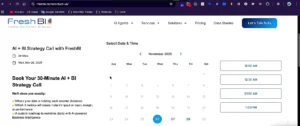
Step 1: Confirm Booking Widget Is an iFrame
Open your website and inspect the booking section.
Right-click → View Frame Source.
✔ If the widget loads inside an iframe, the booking system is embedded.
Figure 1: GoHighLevel iFrame Booking
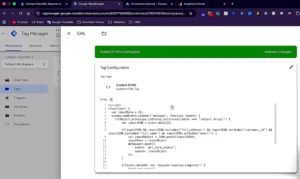
Step 2: Add GoHighLevel Booking Listener Script
Add the custom JavaScript listener code to your website or Google Tag Manager.
✔ This script will:
- Detect GoHighLevel booking completion
- Capture booking events
- Push booking data to the Data Layer
Figure 2: GoHighLevel Listener Script
PART 2 – Test Data Layer Event
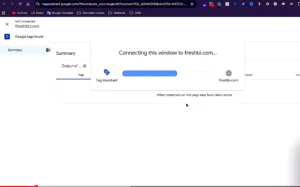
Step 3: Open GTM Preview Mode
Open Google Tag Manager → Click Preview → Enter your website URL → Connect.
✔ If preview connects successfully, GTM is working correctly.
Figure 3: GTM Preview Connected
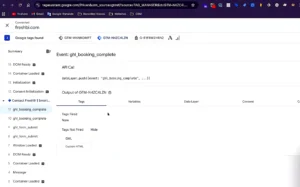
Step 4: Test Booking Submission
Create a test booking on your website.
✔ Confirm the following events:
- form_submit
- booking_complete
Use booking_complete for conversion tracking.
Figure 4: Booking Complete Event
PART 3 – Create GoHighLevel Booking Tracking Trigger
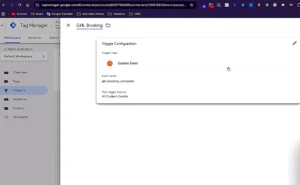
Step 5: Create Custom Event Trigger
Navigate to GTM → Triggers → New
- Trigger Type: Custom Event
- Event Name: ghl_booking
- Click Save
Figure 5: Custom Event Trigger
PART 4 – Google Ads Conversion Tracking for GoHighLevel
Step 6: Create Google Ads Conversion Action
Open Google Ads → Tools & Settings → Conversions
- Create a new conversion action
- Select Website
- Choose Google Tag Manager as the implementation method
Copy:
- Conversion ID
- Conversion Label
Figure 6: Google Ads Conversion Setup
Learn More about Google Ads Conversion Setup.
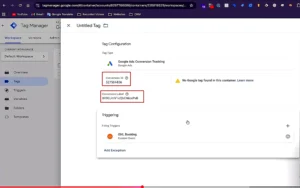
Step 7: Create Google Ads Conversion Tag
Open GTM → Tags → New
- Tag Type: Google Ads Conversion Tracking
- Enter Conversion ID and Label
- Trigger: ghl_booking
Figure 7: Google Ads Conversion Tag
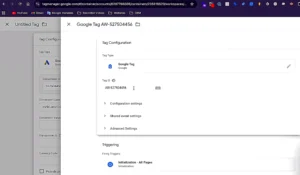
Step 8: Create Required Google Ads Tags
Google Tag
- Tag Type: Google Tag
- Trigger: All Pages
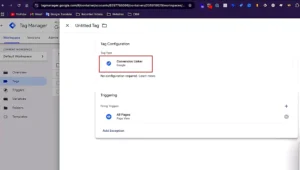
Conversion Linker
- Tag Type: Conversion Linker
- Trigger: All Pages
This ensures accurate Google Ads attribution.
Figure 8: Conversion Linker Tag
For improved data accuracy and privacy-focused tracking, read Google Ads First-Party Server-Side Tracking with GTM & Stape.
PART 5 – GA4 Booking Event Tracking
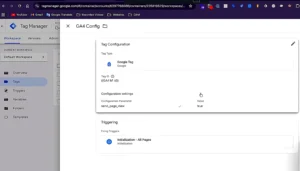
Step 9: Create GA4 Configuration Tag
- Tag Type: Google Tag
- Enter GA4 Measurement ID
- Trigger: All Pages
Figure 9: GA4 Configuration Tag
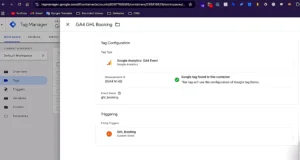
Step 10: Create GA4 Booking Event Tag
- Tag Type: GA4 Event
- Event Name: booking
- Trigger: ghl_booking
Figure 10: GA4 Booking Event Tag
Learn more about GA4 events.
For similar setups, explore How to Track Tally Form Submissions with GTM & Google Ads.
Testing GoHighLevel Booking Tracking
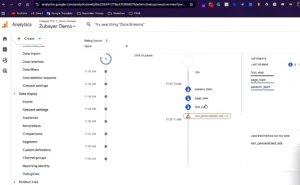
Open GTM Preview Mode → Open GA4 DebugView → Create another test booking.
✔ Confirm the following:
➜ GoHighLevel booking event fires
➜ Google Ads conversion tag fires
➜ GA4 booking event fires
Figure 11: DebugView Booking Event
Comparison: Default vs GTM-Based GoHighLevel Tracking
| Feature | Default Tracking | GTM-Based Tracking |
| Tracks iFrame Bookings | ❌ No | ✅ Yes |
| Google Ads Conversions | ❌ Limited | ✅ Accurate |
| GA4 Event Tracking | ❌ Unreliable | ✅ Reliable |
| Data Layer Integration | ❌ No | ✅ Yes |
| Attribution Accuracy | ❌ Low | ✅ High |
| Campaign Optimization | ❌ Limited | ✅ Data-Driven |
Tracking Overview
GoHighLevel booking widgets operate within iframes, preventing native tracking. Using a custom GTM listener and Data Layer integration ensures accurate event detection and reliable reporting in GA4 and Google Ads.
Real Use Case
A digital marketing agency running Google Ads for a coaching business implemented GoHighLevel booking tracking using GTM. Before the setup, zero bookings were being tracked — the iframe widget was completely invisible to Google Ads.
After implementation:
- 100% of bookings are now tracked accurately.
- Google Ads attributed bookings to specific campaigns for the first time.
- Smart Bidding recalibrated toward real appointment conversions.
- Cost per booking reduced 35% within 60 days
Common Mistakes
- Not implementing a custom iframe listener
- Incorrect event naming in GTM
- Missing Conversion Linker tag
- Improper trigger configuration
- Not testing in GTM Preview Mode
Pro Tips
- Use structured data layers for scalable tracking.
- Validate events using GA4 DebugView.
- Implement server-side tracking for improved data accuracy.
- Ensure consistent naming conventions across GTM tags.
- Follow advanced strategies from Advanced Squarespace Form Tracking with GTM (Form Listener + Data Layer).
Frequently Asked Questions
Why doesn’t default form tracking work with GoHighLevel?
Default form tracking does not work with GoHighLevel because the booking calendar widget is embedded inside an iframe a separate browser context hosted on GoHighLevel’s own servers. Standard GTM form submit triggers only detect events on the parent page and cannot access content inside iframes. A custom postMessage listener script is required to detect when the booking confirmation fires from inside the iframe and push the event into the GTM Data Layer
on the parent page.
Why is a listener script required?
The listener script is required because GoHighLevel’s booking widget communicates booking confirmations using the browser’s postMessage API, sending a message from inside the iframe to the parent page when a booking is completed. Without a listener
script running on the parent page, GTM has no way to detect this message. The listener captures the booking_complete message and pushes a structured event into the Data Layer, making it available for your Google Ads and GA4 conversion tags to fire.
Which event should be used for tracking?
Use booking_complete as your Data Layer event for GoHighLevel booking tracking. This event fires only when a booking is fully confirmed, not on partial form interactions or calendar date selections. In GTM, create a Custom Event trigger with event name
ghl_booking that fires on the booking_complete Data Layer push. Using a specific confirmed booking event rather than a generic form_submit ensures your Google Ads conversion data represents real appointments and not incomplete interactions.
Can I track GoHighLevel bookings in GA4?
Yes, you can track GoHighLevel bookings in GA4 using Google Tag Manager. Create a GA4 Event tag in GTM with event name booking and set the trigger to your ghl_booking custom event trigger. When a user completes a booking, the listener script fires the Data Layer event, GTM triggers the GA4 tag and the booking event is sent to your GA4 property. You can then mark this event as a conversion in GA4 and use it for attribution reporting and audience building in Google Ads.
Does Google Ads show conversions instantly?
No Google Ads conversions from GoHighLevel booking tracking appear instantly. After a booking fires the conversion tag, there is typically a delay of 3 to 6 hours before the conversion appears in your Google Ads dashboard. The conversion status will initially show as No recent conversions and will update to Recording conversions after the first tracked booking is processed. Always verify your setup using GTM Preview Mode and Google Ads Tag Assistant before waiting for dashboard data.
Conclusion
Implementing GoHighLevel Booking Tracking with GTM ensures accurate, reliable, and scalable conversion tracking. This setup enables precise reporting in GA4 and Google Ads, improves attribution, and enhances overall marketing performance.
Let’s Set Up Your GoHighLevel Booking Tracking!
Ensure precise conversion tracking and unlock actionable insights with a professionally configured GTM, GA4, and Google Ads setup.
👉 WhatsApp: https://wa.me/8801735749155
👉 Book a Call: https://zcal.co/zubayerislam01/consultation
