
Introduction
Google Ads Tally Forms tracking is essential if you’re using Tally to collect leads and want to know which campaigns are actually driving results. Most businesses track form submissions and assume their campaigns are working. But the reality is different. You don’t know:
- Which leads actually become customers
- Which campaigns are generating real revenue
If you’re unsure whether your current tracking system is accurate or missing key data points:
👉 Read: Full Funnel Tracking for Google Ads using CRM, GTM & Stape
With Google Ads Conversion Tracking for Tally Forms, you can track the complete customer journey: Lead → Sales Qualified Lead → Customer → Revenue
In this guide, you’ll learn how to track Tally form submissions with GTM — the same setup I’ve implemented for 50+ agencies as a Stape Certified Partner. This follows Google’s official conversion tracking best practices.
🎥 Watch Now
Figure: Tally Form Tracking Setup using GTM
Struggling to track real conversions from your Tally forms?
I help businesses implement accurate Google Ads Tally Forms tracking using GTM for better attribution and higher ROAS.
👉 WhatsApp: https://wa.me/8801735749155
👉 Book a Call: https://zcal.co/zubayerislam01/consultation
What Is Tally Form Submission Tracking?
Tally form submission tracking is the process of capturing successful Tally form submissions using Google Tag Manager and sending that conversion data to Google Ads and Google Analytics 4. It helps businesses measure leads accurately and optimize campaigns based on real results.
Why Is It Important?
Accurate Tally form tracking helps businesses understand which campaigns generate leads and where conversions are happening.
• Measure real lead generation performance
• Improve Google Ads bidding with accurate data
• Track conversions inside GA4
• Reduce wasted ad spend
• Improve ROI and attribution accuracy
Quick Answer
Google Ads Tally Forms tracking allows you to capture form submission events using a JavaScript listener and send them to Google Ads through GTM. It works by pushing a custom event into the data layer, which triggers a conversion tag. This improves conversion accuracy, attribution, and campaign performance.
Key Takeaways
- Tally form conversion tracking ensures accurate submission
tracking by using a JavaScript listener that pushes events
into the data layer, preventing data loss from browser-based
limitations. - Using a GTM custom HTML listener for Tally forms improves
tracking reliability across all devices and browsers,
capturing submissions that standard tracking methods miss. - This setup enables both Google Ads conversion tracking and
GA4 event tracking for Tally forms, giving you deeper insight
into which campaigns are generating real leads. - Proper implementation improves Google Ads smart bidding
performance, reduces wasted ad spend, and delivers more
accurate ROAS reporting.
Tools Used in This Setup
• Tally Forms
• Google Tag Manager
• Google Ads
• Google Analytics 4
• Data Layer Events
• Custom Event Trigger
• Browser Preview Mode
How the System Works (Simple Flow)
- A visitor lands on your page and submits the Tally form.
- A custom event or listener detects the successful submission.
- The event is pushed into the Data Layer.
- Google Tag Manager fires conversion tags.
- Google Ads and GA4 receive the conversion data.
- Reporting and optimization improve.
Why It Matters
Without accurate Tally form conversion tracking, campaigns may optimize using incomplete data. Proper GTM tracking gives reliable signals to Google Ads, improves smart bidding performance, and helps scale
Prerequisites
- Website with embedded Tally form
- Google Tag Manager installed
- stape.io
- Google Ads conversion action created
- Basic understanding of GTM tags and triggers
Step-by-Step Implementation
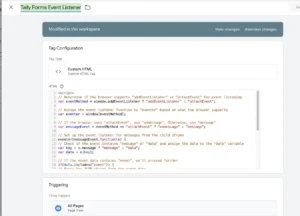
Step 1: Add JavaScript Listener for Tally Form
First to detect Tally form submissions, add a JavaScript listener using a Custom HTML Tag in GTM.
Log in to GTM
Create a Custom HTML Tag
Paste the event listener script
Trigger: All Pages
Save and publish
To understand complete tracking flow, you should learn Full Funnel Tracking for Google Ads using CRM, GTM & Stape.
Figure 1: Tally Form Event Listener Setup
Step 2: Create a Custom Event Trigger
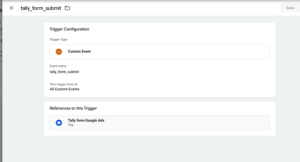
Next, Go to Triggers → New
Trigger Type: Custom Event
Event Name: tally_form_submit
Name it “Tally Form Submit Event”
Save it
Figure 2: Tally Form Custom Event Trigger
Step 3: Create Google Ads Conversion Tag
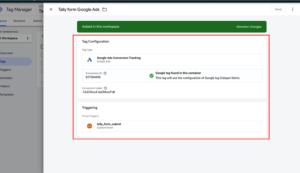
Then, Go to Tags → New
Tag Type: Google Ads Conversion Tracking
Enter Conversion ID and Conversion Label
Trigger: Tally Form Submit Event
Save and publish
➡️ Google Tag Manager event tracking helps send accurate conversion data from GTM to Google Ads.
To improve tracking accuracy and first-party data collection, you can implement Google Ads First Party Server-Side Tracking with GTM & Stape.
Figure 3: Google Ads Conversion Tag Setup
Step 4: Test the Setup
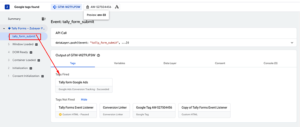
After that, Use GTM Preview Mode
Submit a test Tally form
Check that tally_form_submit appears in the event stream
Confirm Google Ads conversion tag fired
To future-proof your tracking system, consider learning How to Make Future Proof Conversion Tracking in 2026 (Full Funnel System for Lead Generation).
Figure 4: GTM Preview Mode Testing
Step 5: Confirm in Google Ads
Finally, Go to Tools & Settings → Conversions
Check if conversion data appears
Wait for reporting updates
🎉 You’ve now successfully implemented tally form Google Ads conversion tracking using GTM!
Comparison: Default vs GTM-Based Tally Form Tracking
| Feature | Default Tracking | GTM-Based Tracking |
|---|---|---|
| Tracks Tally Form Submissions | ❌ Limited | ✅ Accurate |
| Google Ads Conversions | ❌ Basic | ✅ Reliable |
| GA4 Event Tracking | ❌ Inconsistent | ✅ Accurate |
| Data Layer Integration | ❌ No | ✅ Yes |
| Attribution Accuracy | ❌ Low | ✅ High |
| Campaign Optimization | ❌ Weak | ✅ Better |
Tracking Overview
Tally forms often need custom event tracking for accurate conversion measurement. Using Google Tag Manager, you can capture Tally form submissions, push events into the Data Layer, and send reliable conversion data to Google Ads and Google Analytics 4. This improves attribution accuracy and campaign optimization.
Real Use Case
A lead generation business was running Google Ads to a landing page with a Tally form. Default tracking was missing several conversions.
After implementing GTM-based Tally form tracking:
• Accurate form submission tracking was restored
• Google Ads optimization improved
• Cost per lead decreased
• Conversion reporting became reliable
Common Mistakes
- Not adding the correct GTM custom listener for tally
- Using incorrect event name in trigger
- Missing conversion ID or label
- Not testing setup before publishing
Pro Tips
- Always test tracking using GTM preview mode before publishing
- Enable enhanced conversions to improve match rate and accuracy
- Maintain consistent event naming across all tracking systems
👉 For similar tracking setup, explore How to Track WPForms Conversion with GTM and GA4.
Frequently Asked Question
What is tally form conversion tracking?
Tally form conversion tracking is a method to track tally form submissions using GTM and send conversion data to Google Ads or GA4 for accurate measurement.
How to track tally form submissions with GTM?
You can track tally form submissions by using a JavaScript event listener that pushes a custom event into the data layer and triggers a conversion tag.
Can I track tally forms in GA4?
Yes, you can use GTM to send events to GA4 and implement GA4 event tracking tally forms for detailed analytics.
Why is my tally form conversion not showing?
This usually happens due to incorrect trigger setup, wrong event naming, or delays in Google Ads reporting.
Is enhanced conversion required?
It is not mandatory, but using enhanced conversions improves match rate and conversion accuracy.
Conclusion
In conclusion, tracking only form submissions is no longer enough. With proper tally form conversion tracking using GTM, you can capture accurate data. Also send it to Google Ads for better optimization and performance.
To expand your tracking system further, you can explore How to Track Breely Bookings with GTM & Google Ads Enhanced Conversion.
Want to implement tally form conversion tracking correctly?
I can help you set up a complete tracking system for accurate data, better attribution, and improved campaign performance.
👉 WhatsApp: https://wa.me/8801735749155
👉 Book a Call: https://zcal.co/zubayerislam01/consultation
