
Introduction
Accurate Unbounce Google Ads Conversion Tracking is essential for measuring lead generation performance and optimizing paid campaigns. However, many businesses using Unbounce landing pages still rely on basic tracking methods, which often miss user-level data and lead to inaccurate attribution. As a result, campaigns optimize using incomplete signals, reducing overall performance and ROI.
As a Stape Certified Partner, I’ve implemented this exact setup for 50+ agencies worldwide — and this guide covers every step to get it right the first time.
To solve this, we implement Unbounce Google Ads Conversion Tracking using Google Tag Manager and enable Unbounce Enhanced Conversions GTM to send user-provided data like email and phone number to Google Ads. In addition, this setup improves conversion matching accuracy and allows you to track Unbounce forms in Google Ads more reliably.
➡️ Google Tag Manager helps deploy scalable tracking across websites, forms, and analytics platforms.
To further improve attribution accuracy and recover lost data, explore Google Ads server-side tracking with GTM & Stape (Complete Setup Guide 2026). If you want full-funnel visibility, you can also read How to Set Up Google Ads Offline Conversion Tracking with HubSpot CRM (Complete Guide 2026) for advanced lead attribution and revenue tracking.
🎥 Watch Now
Figure: Unbounce Google Ads Conversion Tracking Setup Using GTM
Struggling to track Unbounce conversions accurately?
Get a professional Unbounce Google Ads conversion tracking setup using GTM, Enhanced Conversions, and data layer tracking for precise attribution and improved ROI.
👉 WhatsApp: https://wa.me/8801735749155
👉 Book a Call: https://zcal.co/zubayerislam01/consultation
What Is Unbounce Google Ads Conversion Tracking?
Unbounce Google Ads Conversion Tracking is the process of capturing Unbounce form submissions and sending that data to Google Ads using Google Tag Manager. In addition, Enhanced Conversions allow sending hashed user data such as email and phone number, which significantly improves match rate and attribution accuracy. Therefore, advertisers can track Unbounce forms in Google Ads with higher precision.
Why Is It Important?
Without proper tracking, Google Ads cannot optimize effectively. However, when accurate data is available, campaigns perform better and scale faster.
• Track Unbounce forms in Google Ads accurately
• Improve attribution with Enhanced Conversions GTM
• Enable better Unbounce lead attribution for PPC
• Reduce data loss caused by browser restrictions
• Improve ROI using high-quality conversion signals
Quick Answer
Unbounce Google Ads Conversion Tracking uses GTM to detect form submissions and send conversion data to Google Ads. In addition, Enhanced Conversions send hashed user data, improving attribution accuracy, match rate, and overall campaign optimization.
Key Takeaways
- Unbounce form tracking with GTM enables accurate conversion measurement.
- Enhanced Conversions improve match rate using user-provided data.
- Data layer tracking ensures reliable and scalable event detection.
- As a result, Google Ads optimization becomes more effective and profitable.
Tools Used in This Setup
- Unbounce Landing Pages
- Google Tag Manager
- Google Ads
- Google Analytics 4
- Data Layer Events
- Custom JavaScript Listener
- stape.io
How the System Works (Simple Flow)
- First, a user lands on the Unbounce page and submits the form.
- Then, a custom listener detects the submission event.
- Next, the event data is pushed into the GTM Data Layer.
- After that, GTM triggers the Google Ads conversion tag.
- Meanwhile, user data such as email and phone is captured.
- In addition, Enhanced Conversions send hashed data to Google Ads.
- Finally, conversions are recorded and used for optimization and reporting.
Why It Matters
If Google Ads only tracks basic form submissions, optimization becomes weak. However, when Enhanced Conversions are enabled, platforms receive stronger and more reliable signals. As a result, campaigns optimize based on real user data rather than incomplete events, improving lead quality, attribution accuracy, and ROI.
Prerequisites
✔ Unbounce landing page with a form
✔ Google Tag Manager installed on the page
✔ Access to Google Ads account
✔ Email and phone fields inside the form
✔ Custom Unbounce form listener script
Step-by-Step Implementation
PART 1 – Verify GTM Installation on Unbounce Page
Step 1: Confirm Google Tag Manager Is Working
Open your Unbounce landing page.
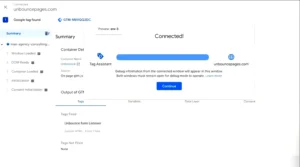
Open Google Tag Manager → Click Preview.
Copy the landing page URL and paste it into the preview connection window → Click Connect.
✔ If preview connects successfully, GTM is installed correctly.
Figure 1: Unbounce Google Ads conversion tracking GTM preview connection
PART 2 – Implement Unbounce Form Listener
Step 2: Add Unbounce Form Listener Script
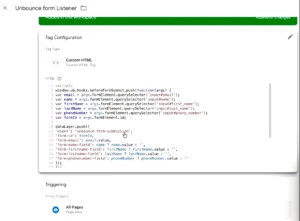
Add the custom JavaScript listener code to detect form submission and push the event to the Data Layer.
✔ This listener captures:
➜ Form submission event
➜ Email field value
➜ Name field value
➜ Phone number field
Event names pushed to Data Layer:
unbounce_form_submission
unbounce_form_submitted
Figure 2: Unbounce GTM data layer form submission tracking setup
PART 3 – Test Form Submission Event
Step 3: Submit Form and Check Data Layer
Submit the form on your Unbounce page.
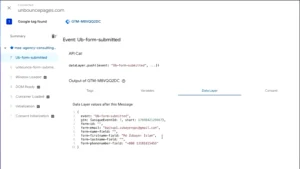
Open GTM Preview Events panel.
✔ You should see two events:
unbounce_form_submission
unbounce_form_submitted
✔ Either event can be used, but in this setup we will use unbounce_form_submitted.
Figure 3: Unbounce form submission event GTM preview
PART 4 – Create GTM Trigger for Form Submission
Step 4: Create Custom Event Trigger
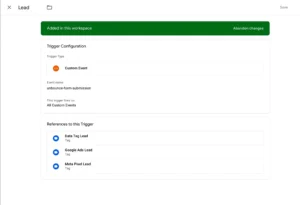
Open GTM → Create a new trigger.
Trigger Type: Custom Event
Event Name: unbounce_form_submitted
Trigger Name: Unbounce Form Submission Trigger
Save the trigger.
Figure 4: Unbounce custom event trigger GTM setup
PART 5 – Create Variables for Enhanced Conversion Data
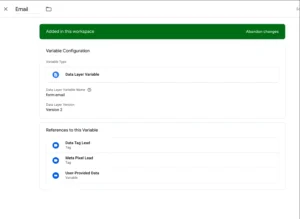
Step 5: Create Email Variable
Create a Data Layer Variable.
Variable Name: form_email
Step 6: Create Phone Variable
Create another Data Layer Variable.
Variable Name: form_phone
Figure 5: Google Ads enhanced conversions user data variables GTM
PART 6 – Create Google Ads Conversion Action
Step 7: Create Conversion Goal in Google Ads
Open Google Ads → Create new conversion action.
Conversion Type: Lead
Conversion Name: Unbounce Form Submission
Implementation Method: Google Tag Manager
✔ Copy: Conversion ID and Conversion Label
Figure 6: Google Ads conversion tracking setup Unbounce lead
PART 7 – Create GTM Variable for Conversion ID
Step 8: Create Conversion ID Constant Variable
Create a Constant Variable in GTM.
Variable Name: Google Ads Conversion ID
PART 8 – Create Required Google Ads Tags
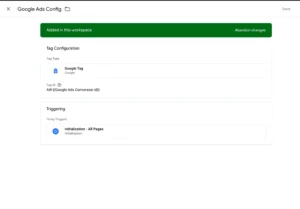
Step 9: Create Google Tag
Create new tag → Tag Type: Google Tag
Trigger: All Pages
Figure 7: Create Google Ads Tags
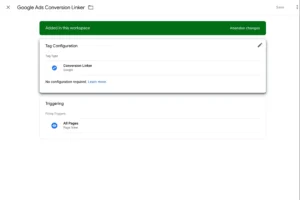
Step 10: Create Conversion Linker Tag
Create another tag → Tag Type: Conversion Linker
Trigger: All Pages
✔ This ensures proper attribution
Figure 8: Google Ads conversion linker tag GTM setup
PART 9 – Create Google Ads Conversion Tracking Tag
Step 11: Create Conversion Tracking Tag
Create a new tag.
Tag Type: Google Ads Conversion Tracking
Add Conversion ID and Conversion Label
Trigger: Unbounce Form Submission Trigger
Figure 9: Google Ads Conversion Tracking Tag
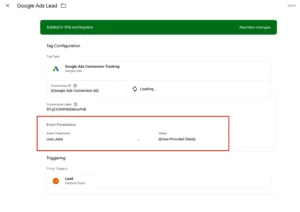
PART 10 – Enable Enhanced Conversions
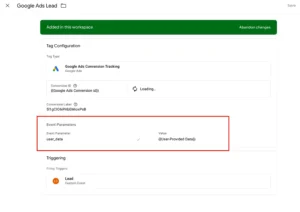
Step 12: Send User Data for Enhanced Conversions
Inside the conversion tag:
Enable User Data Parameters
Add parameters:
Email → form_email
Phone → form_phone
✔ This improves matching accuracy
Figure 10:User Data for Enhanced Conversions
➡️ Google Ads conversion tracking helps measure and optimize campaign performance using real conversion data.
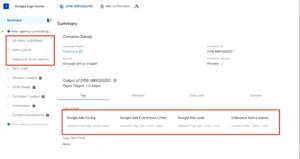
Testing Unbounce Form Conversion Tracking
Open GTM Preview Mode → Submit the form again.
✔ Confirm:
➜ Unbounce form event fires
➜ Google Ads conversion tag fires
➜ Email variable captures user email
➜ Phone variable captures phone number
Figure 11:User Data for Enhanced Conversions
Final Publish Step
Publish the GTM container.
✔ Your Unbounce form conversion tracking with Enhanced Conversions is now active.
Conversions will appear in Google Ads conversion reports.
Comparison: Default vs GTM-Based Unbounce Tracking
| Feature | Default Tracking | GTM + Enhanced Conversions |
| Form Tracking | ❌ Limited | ✅ Accurate |
| Google Ads Data | ❌ Basic | ✅ Enhanced |
| User Data Matching | ❌ No | ✅ Yes |
| Attribution Accuracy | ❌ Low | ✅ High |
| Campaign Optimization | ❌ Weak | ✅ Strong |
Tracking Overview
Unbounce forms often require custom tracking because default methods are limited. Therefore, using GTM with Data Layer and Enhanced Conversions ensures accurate tracking, reliable attribution, and improved Google Ads optimization. In addition, this setup supports advanced use cases like tracking Unbounce forms without a thank you page and verifying conversions in Google Ads Tag Assistant.
Real Use Case
A lead generation business using Unbounce struggled with poor conversion tracking and inconsistent reporting. However, after implementing GTM with Enhanced Conversions:
• Conversion tracking accuracy improved significantly
• Google Ads optimization stabilized
• Cost per lead decreased
• Attribution visibility increased
For advanced attribution, explore How to Set Up Google Ads Offline Conversion Tracking with HubSpot CRM (Complete Guide 2026).
Common Mistakes
- Not using Data Layer tracking
• Missing Enhanced Conversion setup
• Incorrect event naming
• Not testing in GTM Preview Mode
• Missing Conversion Linker tag
Pro Tips
- Verify events using Google Ads Tag Assistant
• Use consistent event naming across GTM
• Track Unbounce forms without thank you page using Data Layer
• Send both email and phone for better matching accuracy
• Follow Unbounce form tracking best practices 2026
• Explore Unbounce GTM data layer form submission tracking for advanced setups
Frequently Asked Question
How to track Unbounce forms in Google Ads?
Use GTM to deploy a custom JavaScript listener that detects Unbounce form submissions and pushes an event into the Data Layer. Then create a Google Ads Conversion Tracking tag in GTM triggered by that event to send accurate conversion data to Google Ads.
What is Enhanced Conversions in Google Ads?
Enhanced Conversions is a Google Ads feature that sends hashed user-provided data such as email address and phone number alongside conversion events. This improves conversion match rate, strengthens attribution accuracy, and helps Google Ads optimize campaigns using real user signals.
Can I track Unbounce forms without a thank-you page?
Yes. By using Data Layer event tracking in GTM you can detect form submissions directly on the landing page without needing a separate thank-you page. The custom listener captures the submission event and pushes it into the Data Layer immediately after the form is submitted.
Why is Unbounce conversion tracking not working?
This usually happens due to an incorrect trigger setup in GTM, a missing or misconfigured form listener script, wrong event naming in the custom event trigger, or a missing Conversion Linker tag. Always test in GTM Preview Mode before publishing the container.
How to verify Unbounce conversions?
Use GTM Preview Mode to submit a test form and confirm the unbounce_form_submitted event fires correctly. Then check Google Ads Tag Assistant to verify the conversion tag fired with the correct Conversion ID and Label. Conversions typically appear in Google Ads reports within 24 hours.
Conclusion
Implementing Unbounce Google Ads Conversion Tracking with Enhanced Conversions ensures accurate, scalable, and reliable tracking. As a result, businesses can improve attribution, optimize campaigns, and increase ROI.
Ready to implement Unbounce conversion tracking for your business?
Start your setup today and capture accurate data to improve campaign performance and ROI.
👉 WhatsApp: https://wa.me/8801735749155
👉 Book a Call: https://zcal.co/zubayerislam01/consultation
