
Introduction
Accurate purchase tracking for Squarespace stores running Google Ads is critical for e-commerce businesses that rely on paid traffic. Most Squarespace stores lack a proper conversion tracking setup, which leads to missing purchase data, poor campaign optimization and unreliable revenue attribution.
As a Stape Certified Partner, I specialize in building advanced tracking systems using GTM, server-side tracking, and enhanced conversions. Therefore, this ensures accurate data flow, better attribution, and reliable performance across the full funnel.
➡️ Google Tag Manager setup for Squarespace conversion tracking.
In this guide, you’ll learn how to implement squarespace google ads conversion tracking using google tag manager squarespace and enhanced conversions. As a result, you can track real purchase data and improve campaign performance. For advanced setups, explore Google Ads First Party Server-Side Tracking with GTM & Stape and Full Funnel Tracking for Google Ads using CRM, GTM & Stape.
🎥 Watch Now
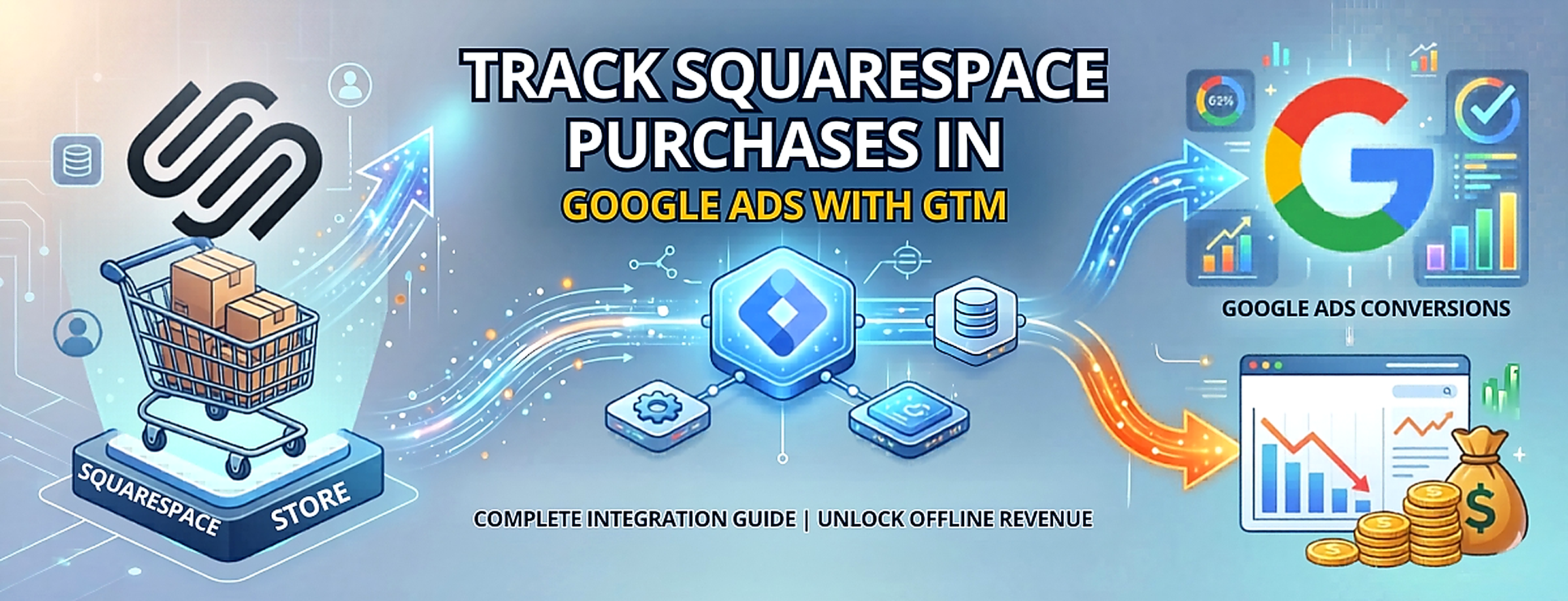
Figure 1: Squarespace Purchase Tracking Flow (GTM → Data Layer → Google Ads)
Struggling to track Squarespace purchases in Google Ads?
Your tracking is incomplete, which breaks attribution and wastes budget.
👉 WhatsApp: https://wa.me/8801735749155
👉 Book a Call: https://zcal.co/zubayerislam01/consultation
What Is Track Squarespace Purchases Google Ads?
track squarespace purchases google ads refers to capturing purchase events from your Squarespace store and sending them to Google Ads using squarespace gtm and enhanced conversions. These events include transaction ID, value, and customer data.
As a result, Google Ads can connect purchases to ad clicks. Therefore, it improves attribution, bidding, and campaign performance.
Why Important
Without proper google ads conversion tracking squarespace, campaigns rely on incomplete data. However, this creates major attribution gaps. Therefore, squarespace conversion tracking becomes essential.
- Accurate purchase tracking
- Better campaign optimization
- Improved ROAS
- Full-funnel visibility
➡️ Learn more: Squarespace Purchase Tracking GA4 Setup with GTM (Complete Guide 2026).
Quick Answer
track squarespace purchases google ads using google tag manager squarespace by capturing purchase data on the order confirmation page and sending it to Google Ads. As a result, conversions are tracked accurately. Therefore, campaigns optimize better and generate higher ROI.
Key Takeaways
- Default Squarespace Google Ads tracking does not capture purchase data. GTM with a custom Data Layer Push on the order confirmation page is required to send transaction ID, revenue, and currency to Google Ads accurately.
- Enhanced Conversions significantly improve purchase attribution by sending the hashed customer email. Every conversion event allows Google to match purchases to ad clicks even when cookies are blocked by iOS or browser privacy settings.
- The Data Layer push must be placed in Squarespace’s Order Status Page Code Injection section, which is not in the global header, so it only fires on actual order confirmations and not on every page load.
- Always validate the complete purchase flow in GTM Preview Mode before publishing, confirming the transaction ID, revenue, and currency are all populated correctly in the Data Layer before going live.
Tools Used
- Google Tag Manager
- Google Ads
- Squarespace
- Data Layer
- Enhanced Conversions
- stape.io
How the System Works
First, a user clicks your google ads squarespace campaign and lands on your site. Then, when a purchase happens, the squarespace purchase event gtm is triggered. Next, GTM captures data from the squarespace data layer for google ads. Meanwhile, enhanced conversions collect user data securely. Finally, Google Ads records the conversion.
Why It Matters
If google conversion tracking squarespace is not set up, Google Ads cannot optimize properly. As a result, performance drops. However, with enhanced conversions google ads squarespace, tracking becomes more accurate. Therefore, campaigns scale efficiently.
Prerequisites
✔ Google Ads account
✔ GTM installed on Squarespace
✔ Access to code injection
✔ Defined purchase conversion
✔ Order confirmation page active
Step-by-Step Implementation
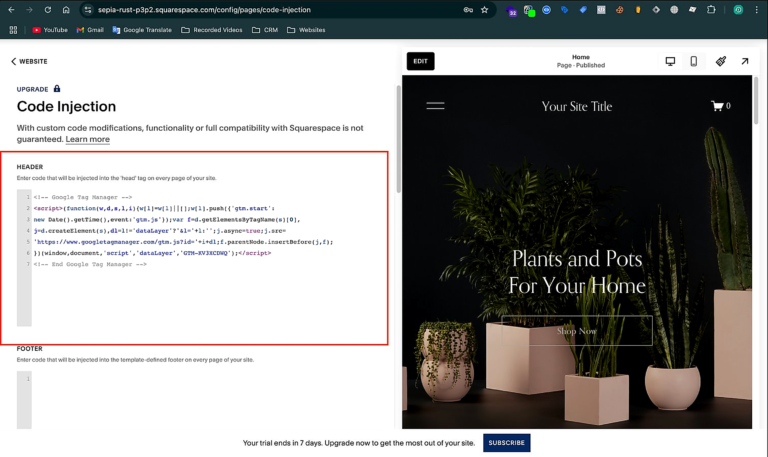
Step 1: Add GTM to Your Squarespace Website
Go to your Squarespace Dashboard. Then, navigate to:
Website > Pages > Custom Code > Code Injection.
Paste your GTM container code inside the Header field. Next, click Save.
Figure 2: GTM Setup on Squarespace
Step 2: Add Purchase Data Layer to the Order Status Page
We’ll push the purchase event into the data layer so GTM can capture it.
Still under: Dashboard > Website > Pages > Custom Code > Code Injection.
Scroll to the Order Status Page section. Then, add the following script.
Figure 3: Squarespace Data Layer Setup

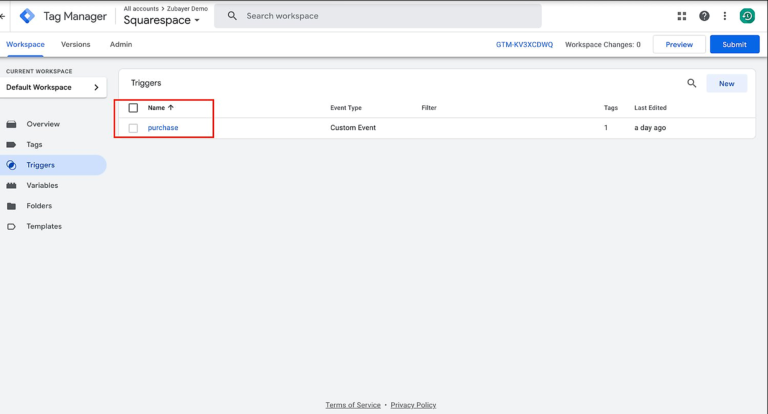
Step 3: Create a Trigger for Purchase Event in GTM
Go to GTM → Triggers > New.
Name it: Purchase.
Trigger Type: Custom Event.
Event Name: purchase.
Fire on: All Custom Events.
Figure 4: GTM Purchase Trigger
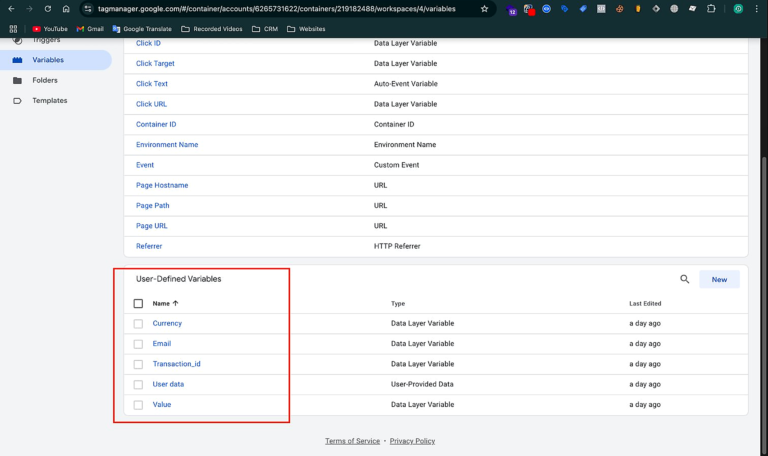
Step 4: Create Data Layer Variables in GTM
We’ll create 5 variables in total.
For the Google Ads Purchase Tag (3 variables):
DLV – transaction_id
Type: Data Layer Variable
Name: ecommerce.transaction_id
DLV – value
Type: Data Layer Variable
Name: ecommerce.value
DLV – currency
Type: Data Layer Variable
Name: ecommerce.currency
For Google Ads Enhanced Conversions (2 variables):
DLV – customerEmailAddress
Type: Data Layer Variable
Name: customerEmailAddress
User Data Variable – Email Only
Type: Google Ads User-Provided Data
Select: Email
Set email to: {{DLV – customerEmailAddress}}
Figure 5: GTM Data Layer Variables
Step 5: Create Google Ads Purchase Conversion Tag
Go to GTM → Tags > New.
Name it: Google Ads – Purchase Conversion.
Tag Type: Google Ads Conversion Tracking.
Enter your Conversion ID and Label.
Enable: “Include user-provided data from your website” ✅
Under “User-provided data”, select the User Data Variable – Email Only.
Set the following:
Conversion Value: {{DLV – value}}
Transaction ID: {{DLV – transaction_id}}
Currency Code: {{DLV – currency}}
Trigger: Purchase Event – Squarespace
Figure 6: Google Ads Conversion Tag Setup

Step 6: Preview & Test
In GTM, click Preview.
Visit your Squarespace store and place a test order.
On the Order Status Page:
Confirm the purchase event appears in Preview Mode.
Check the Console for: ✅ GA4 format dataLayer pushed successfully.
Ensure the Google Ads tag fires correctly.
Figure 7: GTM Preview Mode Testing

Step 7: Publish the GTM Container
Click Submit in GTM.
Add a version name like Squarespace Purchase Setup.
Then, click Publish.
Step 8: Verify Conversion in Google Ads
Go to Google Ads > Tools & Settings > Conversions.
Find your Purchase Conversion Action.
Status should show:
“No recent conversions” → then
“Recording conversions” after data starts coming in.
Figure 8: Google Ads Conversion Verification

Testing
Validate your setup using GTM Preview and Google Ads diagnostics. As a result, you can confirm that the tracking system is working correctly.
✔ GCLID captured correctly
✔ Purchase event triggered successfully
✔ Google Ads purchase conversion tag fired correctly
✔ Conversion recorded inside Google Ads
Final Publish Step
Once testing is completed, publish your GTM container and monitor conversion data inside Google Ads. As a result, data will begin syncing properly. Therefore, you can validate attribution accuracy and track real purchase performance.
✔ Confirm conversions are being recorded
✔ Check conversion status updates
✔ Validate attribution using transaction data
✔ Monitor performance trends regularly
Comparison
| Feature | Default Tracking | Advanced Tracking |
| Data Accuracy | ❌ Partial tracking only | ✅ Complete purchase tracking |
| Attribution | ❌ Limited visibility | ✅ Full-funnel attribution |
| Optimization Signals | ❌ Weak signals | ✅ Strong data-driven signals |
| ROI Impact | ❌ Lower performance | ✅ Higher return on ad spend |
| Data Coverage | ❌ Missing purchase data | ✅ Complete ecommerce data |
| Decision Making | ❌ Incomplete insights | ✅ Reliable data-driven decisions |
Tracking Overview
This system uses google tag manager squarespace to capture purchase data from the order confirmation page and send it to Google Ads. Then, enhanced conversions securely match user data with ad clicks. As a result, tracking becomes accurate and reliable. In addition, businesses gain better attribution clarity, stronger optimization signals, and improved campaign performance.
Real Use Case
A Squarespace ecommerce store implemented this google ads conversion tracking squarespace setup using GTM and enhanced conversions. As a result, the business achieved measurable performance improvements and more reliable attribution.
- 45% increase in tracked conversions, which improved data accuracy
- ROAS increased by 2.3x, leading to better campaign profitability
- Improved scaling due to stronger optimization signals and complete tracking
Common Mistakes
Many tracking issues occur due to incorrect setup and lack of validation. For example, missing critical components can break the entire tracking flow. As a result, attribution becomes unreliable and campaign performance suffers.
- Missing data layer implementation on the order confirmation page
- Incorrect trigger configuration inside GTM
- Skipping proper testing before publishing
Pro Tips
To ensure accurate squarespace conversion tracking, follow these best practices. In addition, consistent monitoring helps maintain data accuracy over time.
- Always validate tracking regularly using GTM Preview and Google Ads diagnostics
- Use enhanced conversions to improve data matching and attribution accuracy
- Test the full purchase flow before going live to avoid data loss
Frequently Asked Questions
How to track squarespace purchases google ads?
Use google tag manager squarespace to capture purchase events and send them to Google Ads. As a result, you can track sales and improve campaign optimization.
What is enhanced conversion in Google Ads Squarespace setup?
Enhanced conversions use first-party data to improve tracking accuracy. Therefore, Google can match conversions better and improve performance.
Why is my squarespace conversion tracking not working?
Tracking may fail due to missing data layer, wrong triggers, or setup errors. As a result, always test using GTM Preview before publishing.
Do I need google tag manager squarespace for purchase tracking?
Yes, google tag manager squarespace enables flexible and accurate tracking. Therefore, it helps improve conversion data quality.
How to verify google ads conversion tracking squarespace?
Use GTM Preview and complete a test purchase. Then, check if the conversion appears in Google Ads.
Can I track purchase value in Google Ads Squarespace?
Yes, send purchase value using GTM data layer variables. As a result, Google Ads can optimize based on revenue data.
Conclusion
Implementing track squarespace purchases google ads ensures accurate tracking and better optimization. As a result, businesses can scale faster and improve ROI. Therefore, this setup is essential for growth.
➡️ Learn more: How to Make Future Proof Conversion Tracking in 2026 (Full Funnel System for Lead Generation)
Ready to fix your Google Ads tracking and scale performance?
Get a complete GTM + Purchase Tracking setup for accurate data, better attribution, and higher ROI.
👉 WhatsApp: https://wa.me/8801735749155
👉 Book a Call: https://zcal.co/zubayerislam01/consultation