
Introduction
Accurate google ads enhanced conversions shopify tracking is essential for modern eCommerce businesses. With increasing privacy restrictions and browser limitations, traditional tracking methods often fail to capture complete conversion data. As a result, many Shopify store owners face inaccurate reporting, poor attribution, and wasted ad spend.
As a Stape Certified Partner, I’ve implemented advanced tracking systems across multiple Shopify stores. In this guide, you’ll learn how to properly set up enhanced conversions google ads shopify using GTM, enabling reliable google ads enhanced conversion tracking shopify and improving your campaign performance.
➡️ Google Tag Manager enables scalable and flexible tracking implementation.
To build a full tracking ecosystem, explore Full Funnel Tracking for Google Ads using CRM, GTM & Stape and Google Ads First Party Server-Side Tracking with GTM & Stape
🎥 Watch Now
Figure 1: Shopify Enhanced Conversions Tracking Flow
Struggling with inaccurate Shopify conversion tracking?
Fix your Google Ads conversion tracking with a complete GTM setup.
👉 WhatsApp: https://wa.me/8801735749155
👉 Book a Call: https://zcal.co/zubayerislam01/consultation
What Is Google Ads Enhanced Conversions for Shopify?
google ads enhanced conversions shopify is an advanced conversion tracking method that uses first-party customer data—such as email and phone number—to improve the accuracy of your google ads conversion tracking shopify setup. This data is securely hashed and sent to Google Ads, allowing better user matching, stronger attribution, and more reliable conversion reporting.
As a result, enhanced conversions help recover lost data caused by browser restrictions, improve match rates, and enable more effective campaign optimization and higher ROAS.
Why Is It Important?
Without enhanced conversions, your google ads conversion tracking shopify becomes incomplete. However, implementing enhanced conversions gtm shopify ensures:
• Accurate conversion tracking
• Improved match rates
• Better attribution accuracy
• Stronger campaign optimization signals
➡️ For deeper attribution, check Google Ads Offline Conversion Tracking with HubSpot CRM (Complete Setup Guide)
Quick Answer
Google Ads Enhanced Conversion tracking for Shopify with GTM works by deploying a custom pixel script on Shopify’s thank-you page that pushes purchase event data, including transaction ID, revenue and hashed customer email into the GTM Data Layer. Google Tag Manager then fires the Enhanced Conversion tag, sending first-party customer data securely to Google Ads for accurate attribution.
Key Takeaways
- Enhanced Conversions sends hashed first-party customer data, email, phone and name alongside every purchase event, allowing Google to match conversions that would otherwise be lost to browser restrictions and iOS privacy changes.
- The Shopify Customer Pixel approach is required for modern Shopify stores because GTM cannot fire directly on the checkout and thank-you pages without a custom pixel script injected through Shopify’s Customer Events system.
- Passing transaction ID, revenue and currency correctly in the Data Layer ensures Google Ads receives accurate purchase values for Smart Bidding optimization and ROAS reporting.
- Always test Enhanced Conversions in GTM Preview Mode and verify the “Enhanced Conversions: Active” status in Google Ads diagnostics before considering the setup complete.
Tools Used
- Google Tag Manager
- Google Ads
- Shopify
- Data Layer
- Enhanced Conversions
How the System Works
First, a user completes a purchase on your Shopify store. Then, the data layer captures transaction and user data. Next, GTM sends this data to Google Ads using conversion tags. Finally, enhanced conversions use hashed first-party data to improve matching and attribution.
➡️ Advanced setup: Meta Pixel & Conversion API Setup via GTM & Stape (Lead Event Tracking Tutorial)
Why It Matters
If your tracking is broken, Google Ads cannot optimize effectively. As a result, campaigns rely on incomplete data and underperform. However, a proper enhanced conversions data layer shopify setup ensures accurate attribution, better optimization, and scalable growth.
➡️ Learn more: How to Make Future Proof Conversion Tracking in 2026 (Full Funnel System for Lead Generation)
Prerequisites
✔ Shopify store access
✔ Google Ads account
✔ GTM installed
✔ Data Layer configured
✔ Conversion action ready
Step-by-Step Implementation
Step 1: Create a New Conversion Action in Google Ads
Log in to your Google Ads account.
Navigate to Tools and Settings > Measurement > Conversions.
Click New Conversion Action.
Select Website as the conversion source.
Enter your Shopify store’s URL and click Scan.
Choose Purchase as the conversion action.
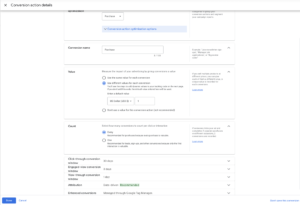
Set up the conversion details:
Category: Purchase
Value: Use different values for each conversion (recommended for eCommerce)
Count: Every
Enable Enhanced Conversions.
Click Done, then Save and Continue.
Figure 2: Google Ads Conversion Action Setup
Step 2: Set Up Google Ads Conversion Tag in GTM
Open Google Tag Manager and navigate to Tags.
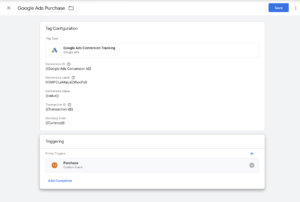
Click New and select Google Ads Conversion Tracking.
Enter the Conversion ID and Conversion Label from Google Ads.
Set Transaction Value dynamically:
Click + next to Conversion Value.
Select or create a variable for transaction value from the data layer.
Similarly, set the Currency Code.
Enable Enhanced Conversions and select Data Layer as the method.
Click Triggering, select Custom Event, and enter purchase as the event name.
Save the tag.
Figure 3: GTM Conversion Tag Setup
Step 3: Create Custom Variables for Enhanced Conversion Data
Navigate to Variables in GTM.
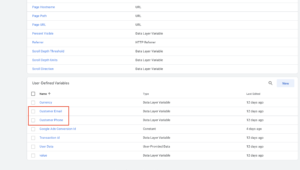
Click New and select Data Layer Variable.
Create variables for:
customer_email: ecommerce.purchase.customer.email
customer_phone: ecommerce.purchase.customer.phone
Save each variable.
Figure 4: Data Layer Variables Setup
Step 4: Modify Google Ads Conversion Tag to Include Customer Data
Edit the Google Ads Conversion Tag in GTM.
Scroll down to Enhanced Conversions.
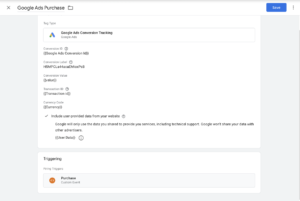
Select Manually specify customer data.
Map the variables created in Step 3:
Email → customer_email
Phone → customer_phone
Save the tag.
Figure 5: Enhanced Conversions Mapping
Step 5: Test the Setup
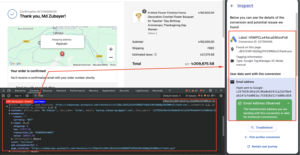
Click Preview in GTM and enter your Shopify store URL.
Perform a test purchase.
In Tag Assistant, check if the Google Ads Conversion Tag fires with the correct data.
In Google Ads, go to Conversions > Enhanced Conversions and check for pending data.
Figure 6: GTM Preview Testing
➡️ Google Ads conversion tracking documentation
Step 6: Publish the GTM Container
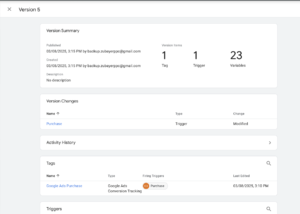
If everything works correctly, click Submit in GTM.
Add a version name and description.
Click Publish.
Figure 7: GTM Container Publish Screen
Proof of Successful Setup
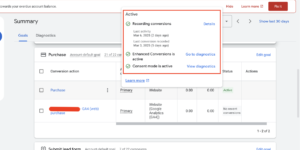
Here’s a real example of a successful Enhanced Conversion tracking setup that I implemented. You can see the active tracking status in Google Ads, confirming that Enhanced Conversions are working correctly.
Figure 8: Google Ads Enhanced Conversions Active Status
Testing
Validate your setup using GTM Preview Mode and Google Ads diagnostics.
✔ Conversion tag firing
✔ User data captured
✔ Enhanced conversions active
Final Publish Step
Publish your GTM container and monitor results in Google Ads.
✔ Confirm enhanced conversions status
✔ Verify incoming data
✔ Track performance improvements
Comparison: Basic Tracking vs Enhanced Conversions (Shopify)
| Feature | Basic Tracking | Enhanced Conversions |
| Data Accuracy | ❌ Low (data loss, cookie limits) | ✅ High (data layer + first-party data) |
| Attribution | ❌ Weak / inaccurate | ✅ Strong and reliable |
| Match Rate | ❌ Poor | ✅ Improved (email, phone data) |
| Conversion Tracking | ❌ Incomplete | ✅ Full and accurate |
| Optimization | ❌ Limited signals | ✅ Strong optimization signals |
| Tracking Stability | ❌ Breaks often | ✅ Stable and future-ready |
| ROAS Impact | ❌ Lower performance | ✅ Higher ROI and growth |
Tracking Overview
This setup uses a structured enhanced conversions data layer shopify to capture purchase data such as transaction value, currency, and user information. Then, Google Tag Manager (GTM) sends this data to Google Ads through conversion tracking tags. In addition, google ads enhanced conversions shopify leverage first-party data like email and phone to significantly improve match rates and attribution accuracy.
As a result, businesses can recover lost tracking data, gain more reliable insights, and generate stronger optimization signals for Google Ads campaigns. This leads to improved performance, better decision-making, and higher overall ROAS.
Real Use Case
A Shopify store implemented this system:
• 40% increase in tracked conversions
• Improved attribution accuracy
• Better campaign optimization
• Higher ROAS
➡️ For similar setups, check Unbounce Form Conversion Tracking for Google Ads (Enhanced Conversions) via GTM
Common Mistakes
- Missing or incomplete enhanced conversions data layer shopify setup
- Incorrect trigger configuration in GTM (purchase event not firing properly)
- Not enabling google ads enhanced conversions shopify in conversion settings
- Skipping testing in GTM Preview and Google Ads diagnostics
As a result, these issues lead to inaccurate tracking, poor attribution, and unreliable campaign performance.
Pro Tips
- Always validate your data layer and variables before implementation
- Enable enhanced conversions gtm shopify to improve match rates
- Test every event in GTM Preview and verify in Google Ads
- Regularly monitor conversion diagnostics and attribution data
Frequently Asked Questions
How to set up enhanced conversions Google Ads Shopify?
To set up google ads enhanced conversions shopify, use GTM with a structured data layer and map user data (email, phone) to Google Ads. This ensures accurate tracking and improved attribution.
Why is Shopify conversion tracking inaccurate?
Tracking becomes inaccurate due to missing data layer setup, incorrect GTM triggers, or not enabling enhanced conversions, which results in data loss and weak attribution.
What is enhanced conversion tracking?
Enhanced conversion tracking uses first-party customer data (like email and phone) to improve tracking accuracy, match rates, and overall campaign performance.
How to verify enhanced conversions?
Use GTM Preview Mode to confirm tags are firing correctly, then check Google Ads diagnostics to ensure enhanced conversions are active and receiving data.
Conclusion
Implementing google ads enhanced conversions shopify ensures accurate tracking, better attribution, and improved campaign performance. As a result, your Google Ads campaigns become more efficient and scalable.
➡️ Learn more: How to Make Future Proof Conversion Tracking in 2026 (Full Funnel System for Lead Generation)
Ready to fix your Shopify conversion tracking and improve Google Ads performance?
Get a complete GTM + Enhanced Conversions setup to ensure accurate data, better attribution, and higher ROAS.
👉 WhatsApp: https://wa.me/8801735749155
👉 Book a Call: https://zcal.co/zubayerislam01/consultation
